




TIP TUESDAY! Quick Search - Application #, Vacancy # & Skills Search

WHAT IS THE TIP?
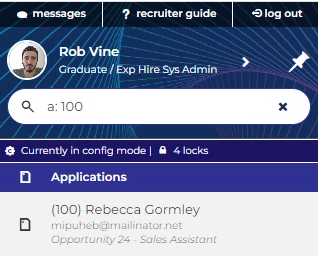
💡 Navigate directly to an application using the "a: [id number]" or "A: [id number]" prefix. If no results show, you know instantly that there is no match.
(The search is no longer case sensitive and will work irrespective of a space after the colon)
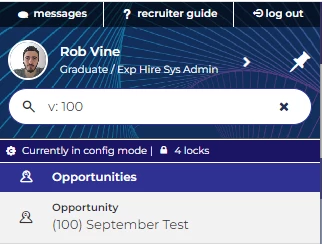
💡Navigate directly to an opportunity using the "v: [id number]" or "V: [id number]"prefix. If no results show, you know instantly that there is no match.
(The search is no longer case sensitive and will work irrespective of a space after the colon)
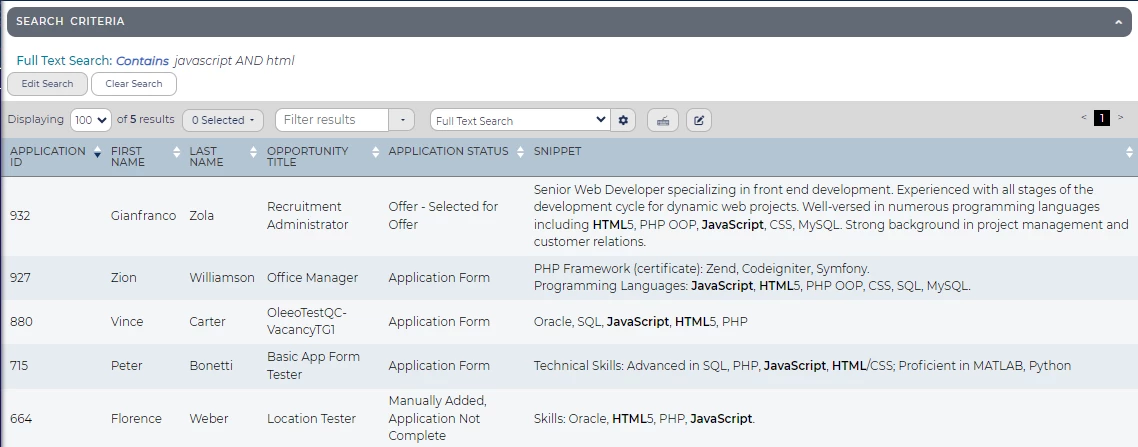
💡 You can run a full text search that will search any free text field on a candidate's applications or attachments such as CV/Resume or cover letter. This is useful if you want to search for specific skills.
- Type Full Text Search into the search box.
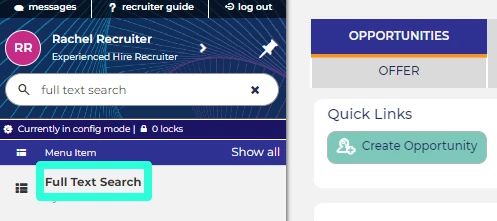
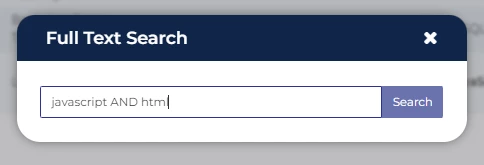
- Click on the resulting link to bring up the full text search box, enter your search criteria and click Search. You can use boolean operators such as AND, OR & NOT to help filter your results.
- When viewing a table of results, edit the layout and add ‘Snippet.’ This will add a column to the table to show where the search results have been found.
BENEFITS
- Faster searching for common vacancies and applications
- Easy to see when no results are returned
- Facilitate shortlisting by easily seeing specific skills required for the role
CONSIDERATIONS
If you are unable to add the ‘snippet’ column into a table layout, you may need to add this into your data dictionary. Please raise a sugar support case to get this added.
COSTS
This feature is part of the standard product offering.
ADDITIONAL INFORMATION:
For additional searching guidance, check out our Searching the System Guidance

