




TIP TUESDAY: Keeping track of your sources🎯

WHAT IS THE TIP?
💡 Finding the ROI of any recruitment campaign or job board posting has been made simple and easy with ad hoc source tracking, you can track the number of applications you are receiving from sources like our Indeed Apply, LinkedIn job posting, Multi-poster as well as custom advert URLs for manually posted sources.
Adhoc Referrer Reporting
💡 Previously, it wasn't easy to report on the source of the application when using our adhoc referrer token as part of the URL (e.g /candidate/so/pm/1/pl/3/opp/38-Project-Delivery-Manager/en-GB?adhoc_referrer=source_name) meaning that it was hard to measure the return on investment on either recruitment marketing strategies, investments on specific job boards or job posting integrations.
This is now a thing of the past, you can start pulling this information into statistical reports and displaying as visual charts and graphs in the report hub. A superuser may need to update your data dictionary with the latest adhoc source database item for you to start benefiting.
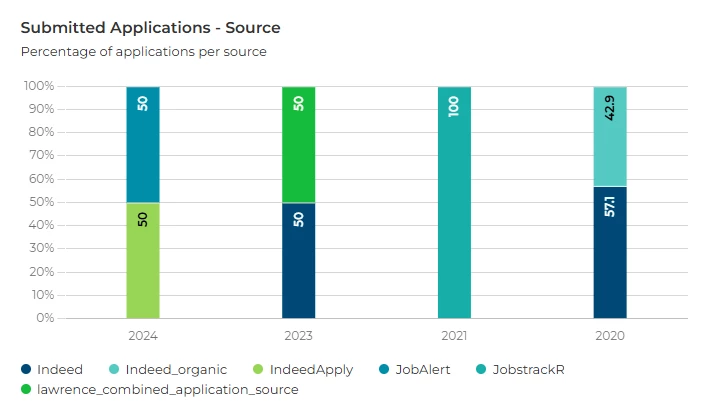
Data Dictionary
The data dictionary items are new, this is to replace any previous iteration that may appear in your data dictionary e.g. “Adhoc referrer (application source)”, but it could also be called something like “Ad Hoc Referrer,” “Adhoc Referrer - Application Source Tracking,” or “Application Source Tracking.”
Adhoc Source (Search):
application.source.adhoc_source_adhoc_referer.id
Adhoc Source (Report):
application.source.adhoc_source_adhoc_referer.source_value
This is very useful for report users who would like to keep a close eye on specific scenarios relating to their campaigns/job boards or want to include source tracking as part of a business report pack.
🔧 Use cases: Use cases could include identifying and reporting on:
- The campaign with the most successful hires
- Which recruitment marketing campaign had the most applications
- Which job board is providing quality candidates
- Has Indeed/LinkedIn/Multi-poster increased diversity of candidates
Ask The Candidate
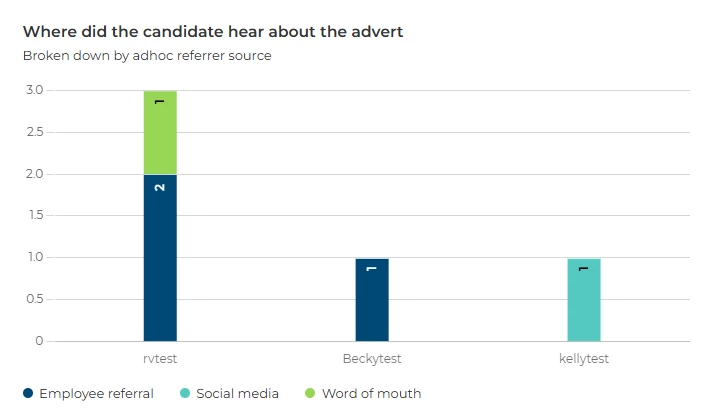
💡 Do you ask the candidate where they heard about the job advert and report on it? Tracking where you posted the job advert with the adhoc referrer will tell you which link the candidate used, asking them where they heard about the role can be a useful addition to your application form as will reveal insights to how your advert is being distributed.
🔧 Use cases: One example could include reporting on:
- An employee referral scheme, using a unique adhoc referrer source per employee (
adhoc_referrer=rvtest), plus an option of “Employee referral” on the question asked to the candidates (“Where did you hear about this role?”). This could create a leader board style report, which employee provides top quality candidates.
Google Analytics
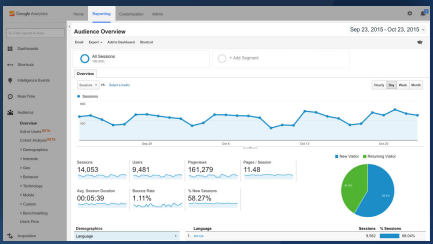
💡 Do you have a marketing team who currently use and are familiar with Google Analytics and Google Tag Manager? Including your GTM key into the candidate side of the system you will begin to reveal further insights.
🔧 Use cases: Who is interested but not applying? Understand the demographic of people visiting your site but have not submitted an application though have used the adhoc referrer source URL to navigate there.
😊 Have you set up any source reports in your system and how have they helped you find ROI? Share your experiences with the community!
BENEFITS
- Stay in the know with particular campaigns or vacancies without having to trawl through data
- Setup scheduled reports to provide regular updates to key stakeholders on source tracking
CONSIDERATIONS
- The system will require the latest data dictionary item to be included in reports
- If no adhoc source value has been included this will able as a “no value” item in reports
Consistent Naming Convention:
Be consistent with your naming conventions for sources to simplify tracking. For example, avoid using "universal_jobmatch" for some vacancies and "universaljobmatch" for others.
- The data can not be edited, if incorrect values have been used (inconsistent source names) this will reflect on the reports.
COSTS
This feature is part of the standard product offering but some additional configuration of your system may be required in some instances.
NEXT STEPS
Reach out to your Oleeo configurators, raise a case with our Support Team or speak to your Customer Success Manager.
ADDITIONAL INFORMATION:
Check out this previous TIP TUESDAY about reporting using saved searches:
Check out this useful user guide for how to set up adhoc referrer in your system, plus information on Google Tag Manager and Analytics:

