




v3.421 Release Notes 28th May 2026

NEW
Unsubscribe from Report Hub emails
We’ve made it easier for receivers of Report Hub emails to decide whether they want to continue receiving them. We now support unsubscribe functionality in the Report Hub email templates.
To enable this, the standard [urlpath="unsubscribe_link"]Click here to unsubscribe[/urlpath] datapath can be added to the relevant email template.
Improvements to importing and exporting email templates
From the list of email templates, you can export the full list of templates as a spreadsheet and import a spreadsheet to easily make changes in bulk. We’ve added new features to make this even more powerful.
On export, you’ll now get a list of the action categories associated with each email template.
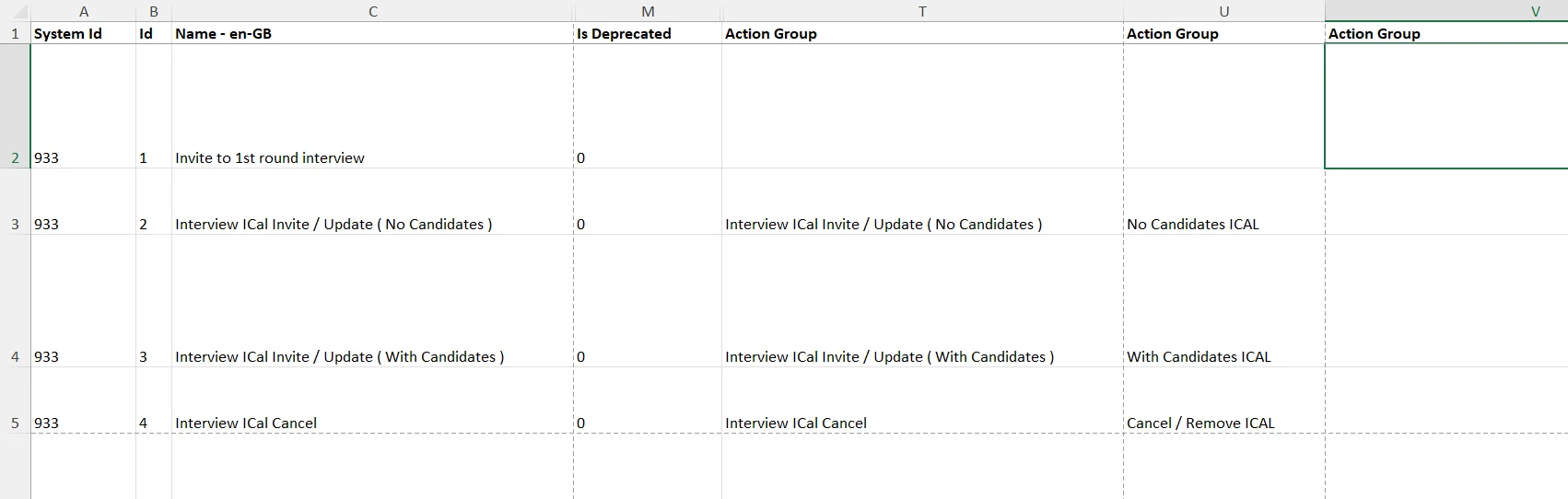
With importing, you can now add action categories. Each one will need to be in its own column called “Action Group”. Any imports without these columns will overwrite any existing action categories.
You are also able to change the deprecation status of the email template using the “Is Deprecated” column. When you deprecate an email template, it will automatically delete all action categories.
Accessibility improvements
We’ve improved the contrast for some of the text in the Oleeo Engage CRM to ensure that it complies with the WCAG standards.
We’ve also made changes to some of our dropdowns to ensure that they have valid ARIA labels which means they can be read by screen readers.
FIXES
Uploading macro-enabled files to the file library
We’ve fixed a defect that prevented files with macros (such as macro-enabled Excel files) from being uploaded to the file library.
Fixing miscount of words when using max word count validation 💡
We’ve also fixed an issue that occurred when form fields have validation to limit the number of words that can be submitted. In some cases, breaks between paragraphs were not counted as breaks between words allowing users to submit text with more than the maximum number of words. This has been addressed so the max word count is fully respected.
These changes were released on 28th May 2025 in version 3.421
💡 The lightbulb icon indicates the feature was based on customer feedback
⚙️ The gear icon indicates a configurable change.
All new features and fixes will automatically appear in your system, unless they are marked as a configurable change. To have a configurable change applied to your system please speak to your Customer Success representative or email customersuccess@oleeo.com. You can also raise a Change Request case in the portal.

