




TIP TUESDAY! What Time Do You Have?

WHAT IS THE TIP?
💡 If you are a global or multinational organisation, trying to align interviews and meetings across multiple timezones can be a challenge. And don't get us started on whether or not they observe daylight savings time! There are different options to ensure that, even if you work in a different timezone to your candidates or colleagues, you will see the information you need in the correct timezone.
System Default
💡 Your system will have a system default timezone as the single source of truth for audit trails. Areas of the platform like ‘History’ will always display in the system default timezone.
Ask your System Administrator if you don't know what your timezone default is.
Vacancy Templates
💡 Don't fall foul of posting vacancies too early or too late if the location of the role is in a different timezone. Set-up a vacancy template for each timezone that you recruit in to ensure the posting opens and closes according to the location.
When creating a new vacancy template, select the appropriate timezone for all vacancies that are posted using the template.
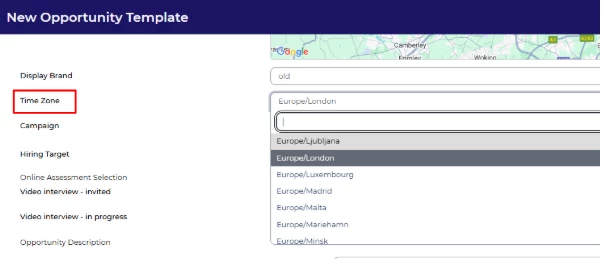
🔧 Use case: I am a recruiter sitting in San Francisco and I am responsible for recruiting for the Latin American region. I recruit primarily for our divisions in Mexico and Brazil. I have set up vacancy templates for each of my locations in separate timezones and use the corresponding template so that my vacancies are posted and unposted in local timezones.
Personal Settings
💡 Individual users can set their local timezone in their ‘Personal Settings’ to ensure that when posting vacancies, reviewing application submission dates/times and form submission dates/times, these are in the preferred timezone.
By clicking on your name in the top left, the ‘Personal Settings’ box will appear. The ‘Timezone’ field is in the bottom right of the ‘My Profile’ tab.
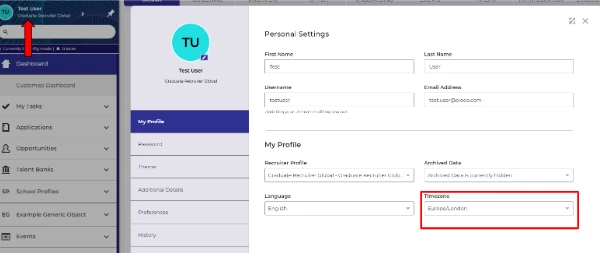
🔧 Use case: I am a recruiter based in Germany and my organisational headquarters are in London. The system default timezone is in GMT so when my candidates apply to my roles based in Germany, the submission times are in GMT. I updated my personal settings and now they display in my local German timezone.
Interview Schedule Settings
💡 When creating an interview schedule, ensure the timings are in your preferred timezone so interviewers and applicants arrive on time.
In ‘Advanced Options’ of the interview schedule, there is a setting for ‘Timezone’ to set the appropriate timezone for where the interviews will be held.
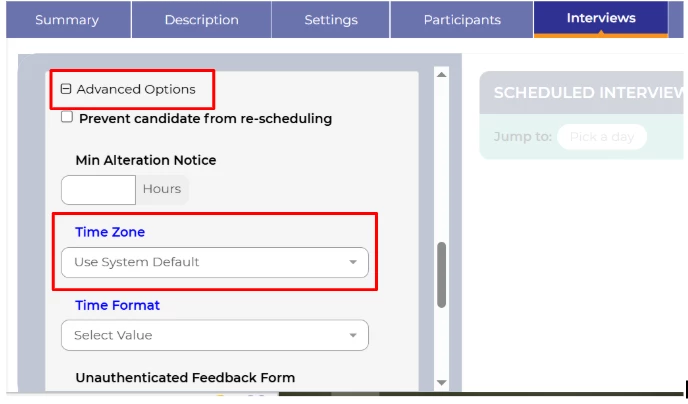
🔧 Use case: I am a recruiter based in Singapore, who looks after campaigns across the APAC region. I ensure the timezone is correct for the interviews when I set up the interview schedule.
😊 Does your organisation work across multiple timezones? What other tips do you have to manage this effectively.
BENEFITS
- Ensures clear communication with applicants.
- Ease of translating timezones.
CONSIDERATIONS
- Not all areas of the system timezones will reflect some settings. Areas like ‘History’ are displayed in the system default for consistency and audit purposes.
- A small config change may be required to allow for individual users to personalise their time zone. If so, please raise a small Change request in Sugar,
COSTS
This feature is part of the standard product offering.
NEXT STEPS
Speak to your Customer Success Manager for more information
ADDITIONAL INFORMATION

