




TIP TUESDAY! Track Withdrawals More Effectively with Multiple Statuses

WHAT IS THE TIP?
💡 Get the full picture of why candidates leave your process! Instead of using a single withdrawal status, why not create multiple statuses for different stages? This allows you to track when and why candidates withdraw, enabling better reporting and insight into drop-off trends.
Categorise Withdrawals by Process Stage
💡 Don't lump all withdrawals into one status - instead, set up distinct statuses for each stage, such as:
- Withdrawn - Apply Stage (before screening)
- Withdrawn - Screening Stage (post-screening but before interview)
- Withdrawn - Interview Stage (after scheduling or attending an interview)
- Withdrawn - Offer Stage (after receiving an offer)
If all withdrawn candidates are moved into one status, you lose valuable data about where they exited. Instead, having withdrawal statuses defined by stage means you can track trends to refine your hiring process. Are candidates leaving after an interview? You might need to improve communication or shorten timelines.
🔧 Use Cases:
- Identify problem stages: Spot patterns in where candidates drop out.
- Improve process efficiency: If withdrawals spike at a certain stage, it may indicate long wait times, unclear expectations, or a competitive job market.
- Enhance DEI analysis: Drill down into withdrawal trends by gender, ethnicity, or location to ensure fair and inclusive hiring.
Use Reporting to Compare Withdrawals vs. Rejections
💡 Want to know if candidates withdraw before they’re rejected? By using separate withdrawal statuses, combined with status group sets, you can track whether candidates are dropping out before being assessed. Taking this further, you can even compare withdrawal trends to rejection rates and analyse differences by gender, ethnicity, or job type.
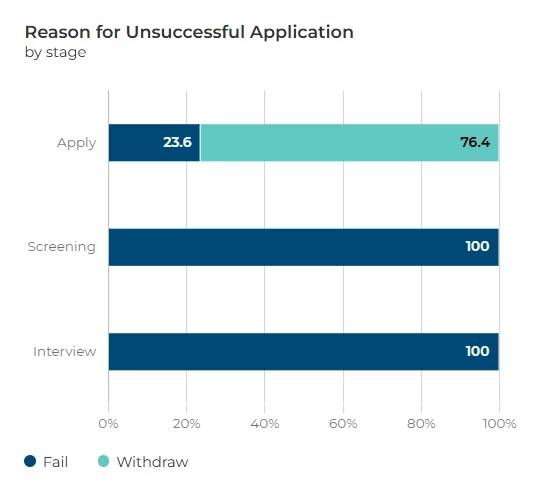
📌 Pro Tip: Overlay rejection and withdrawal data to identify trends. Are candidates removing themselves from certain roles before a hiring decision? This could highlight a misalignment in expectations or a competitor’s stronger offer.
🔧 Use Cases:
- Compare candidate self-selection vs. employer rejection.
- Identify hiring bottlenecks that lead to withdrawals.
- Ensure your recruitment process is engaging and competitive.
😊 How are you tracking withdrawals today? Let us know if this would help your reporting!
BENEFITS
- Improved reporting - Know exactly when and why candidates withdraw.
- Better hiring insights - Compare withdrawals vs. rejections to uncover trends.
- Diversity & Inclusion analysis - Break down withdrawal trends by demographic groups.
- Optimised recruitment strategies - Reduce unnecessary drop-off points.
CONSIDERATIONS
- Ensure recruiters use the correct statuses to maintain data accuracy.
- Update reporting dashboards to reflect the new withdrawal categories.
- Provide training on applying the correct withdrawal statuses.
COSTS
These updates can be completed with level 3 configuration changes. Alternatively, please ask your Oleeo supported user to raise a Sugar case so that an estimate can be provided.
NEXT STEPS
Speak to your Customer Success Manager for best practices.
Raise a case with our Delivery Team to configure new statuses.
ADDITIONAL INFORMATION:

