




TIP TUESDAY! Three simple ways to make fields mandatory - because some things just can’t be skipped!

WHAT IS THE TIP?
💡 Ensuring certain fields are mandatory is a great way to streamline your recruitment process and ensure you’re capturing critical information at every step. In Oleeo, there are three ways to make fields mandatory, all of which are available with Level 1 configuration access.
This quick win config tip will show you the steps you need, plus some handy use cases for when to apply these settings!
The Classic Approach: Setting Fields Mandatory in Form Editor
💡 Navigate to the Form Editor and locate the relevant form and section where the item appears. Make sure the section is editable, then hover over the item and click Settings. Tick the box for Mandatory. And voilà, the field is now essential for your candidates to fill out!
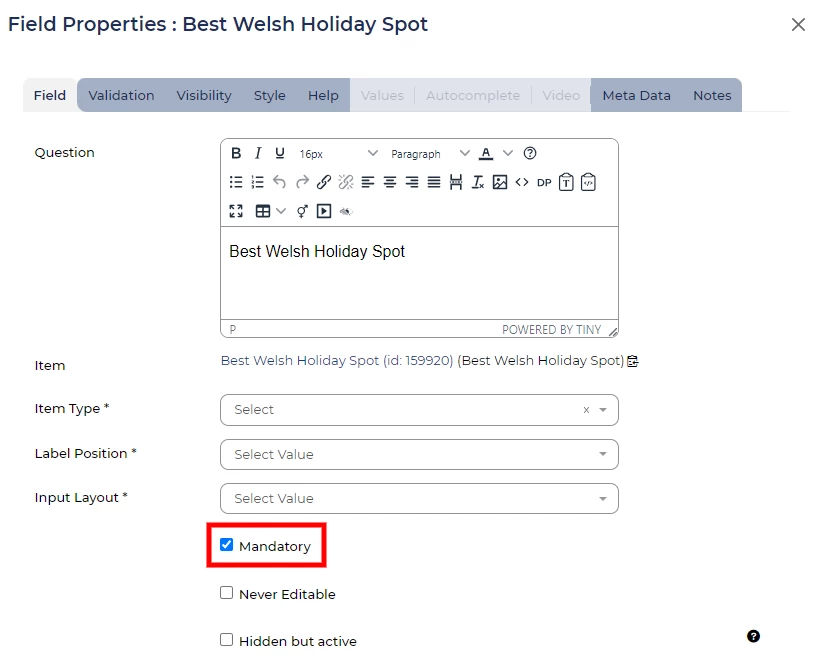
🔧 Use case: When you're initially setting up a form and already in the settings adjusting items, this method can be a natural and efficient way to ensure key fields are mandatory right from the start. It's perfect for forms that require consistent information collection, such as setting up "Preferred Job Location" fields.
The Quick Fix: The Red Star Shortcut
💡 Here’s a little secret: You can make fields mandatory in just a few clicks! Navigate to the Form Editor, find the section and item, and ensure it's editable. Then, click the grey star icon. It’ll turn red and just like that, the field is mandatory!

Don’t want the field mandatory anymore? Simply re-click the red star and this will revert the settings.
🔧 Use case: Use this method when you need a quick tweak, like ensuring contact details are captured during application submission, so you always have up-to-date candidate information.
The Hardcoded Option: Application Items Setting
💡 Need to make a field mandatory permanently, no matter how often it’s added to forms? Head over to Application Items, select the item you want to make mandatory, and click Edit. Under the Settings tab, tick Mandatory. This option ensures the field is mandatory every time it’s used, saving you effort in future configurations.
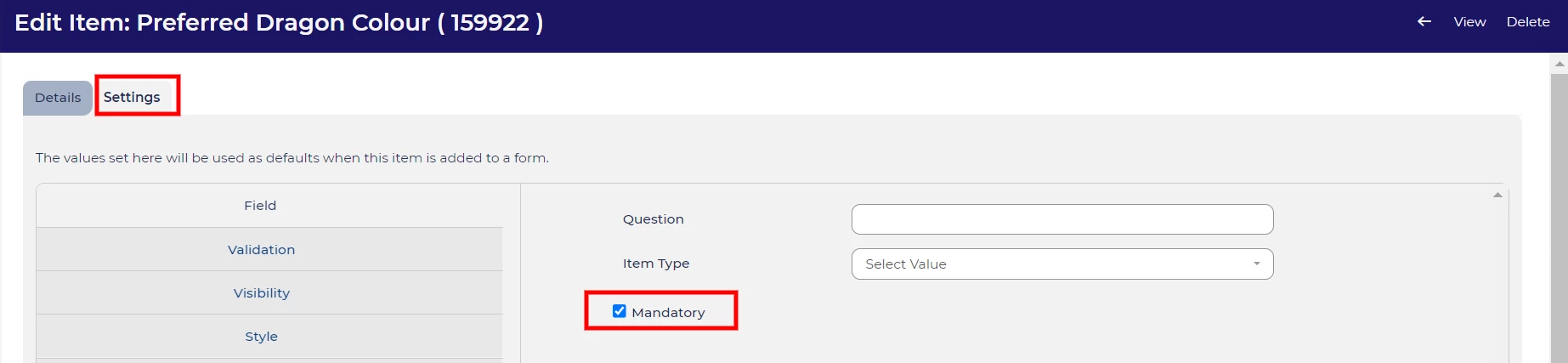
🔧 Use Case: If you have core pieces of data that should always be collected, such as personal details, hardcoding it as mandatory will ensure it’s never missed.
😊 How do you like to make your fields mandatory? Let us know in the comments.
BENEFITS
- Consistency: Ensures all relevant data is collected, every time.
- Compliance: Easily enforce mandatory fields for legal or reporting purposes.
- Efficiency: Use the quick star method to save time on the fly.
- Time-Saving: With hardcoded items, you'll never have to revisit settings for that field again.
CONSIDERATIONS
- Overuse: Be mindful of making too many fields mandatory - this can overwhelm candidates.
- Updates: If you hardcode a field, remember it will always be mandatory in future forms, so ensure it’s a field that will stay relevant.
- Candidate Experience: Consider how mandatory fields impact the overall application flow. Too many might result in drop-offs.
COSTS
This feature is part of the standard product offering.
NEXT STEPS
For more personalised advice, reach out to your Oleeo Customer Success Manager or explore our online configuration guide. Want to learn more tricks? Stay tuned for next week’s Tip Tuesday!

