




TIP TUESDAY! Testing the true candidate experience

WHAT IS THE TIP?
Test the true candidate experience when changes have been made to forms or the candidate application portal by utilising the following tips:
Log in as candidate
💡 ‘Log in as Candidate’ to see how the changes that you have made, affect the candidate.
When you make a change to the candidate forms or the application portal, it is best practice to test the candidate experience to ensure this has not been adversely impacted.
Navigate to your test candidate > Administration > Log in as candidate

You can now review any status messages or forms that have been updated.
NB: Remember to move your test candidate to the correct status for your tests to be conducted.
Multiple testing accounts
💡 Create iterations of your own email address to use over multiple testing accounts.
Postfix the front end of your email (before the @ symbol) with a ‘+’ along with some relevant text to create working versions of your email address. You can create multiple iterations with different text for multiple testing accounts.
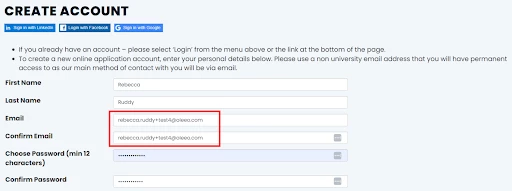
The advantages are:
- Receive the email communications as if you were the candidate.
- Set rules to automatically send the testing emails to a testing folder.
- Clearly see which correspondence is relating to which test by adding relevant text eg: rebecca.ruddy+sourcetest@oleeo.com
Quickly complete forms
💡 Use a browser extension to speed up the testing process.
Speed up testing by using form fillers, such as Fake Filler, to ensure candidate forms are completed quickly and efficiently when testing the candidate experience.
Some organisations may block this functionality and so if in doubt please check with your IT team
😊 Does anyone else have any hints and tips when testing the candidate experience? Comment below!
BENEFITS
- Allows quick, efficient testing to ensure your candidate experience is at the forefront of everything you do.
COSTS
This feature is part of the standard product offering.
NEXT STEPS
Speak to your Customer Success Manager if you would like to learn more.
ADDITIONAL INFORMATION:

