




TIP TUESDAY! Seal the deal with e-signatures

WHAT IS THE TIP?
💡 In today’s virtual world, candidates expect a fully online recruitment experience. Don’t slow down the offer process by posting paper contracts or waiting for wet signatures. Capture offer letter and contract signatures electronically within the ATS.
Option 1: Offer acceptance form
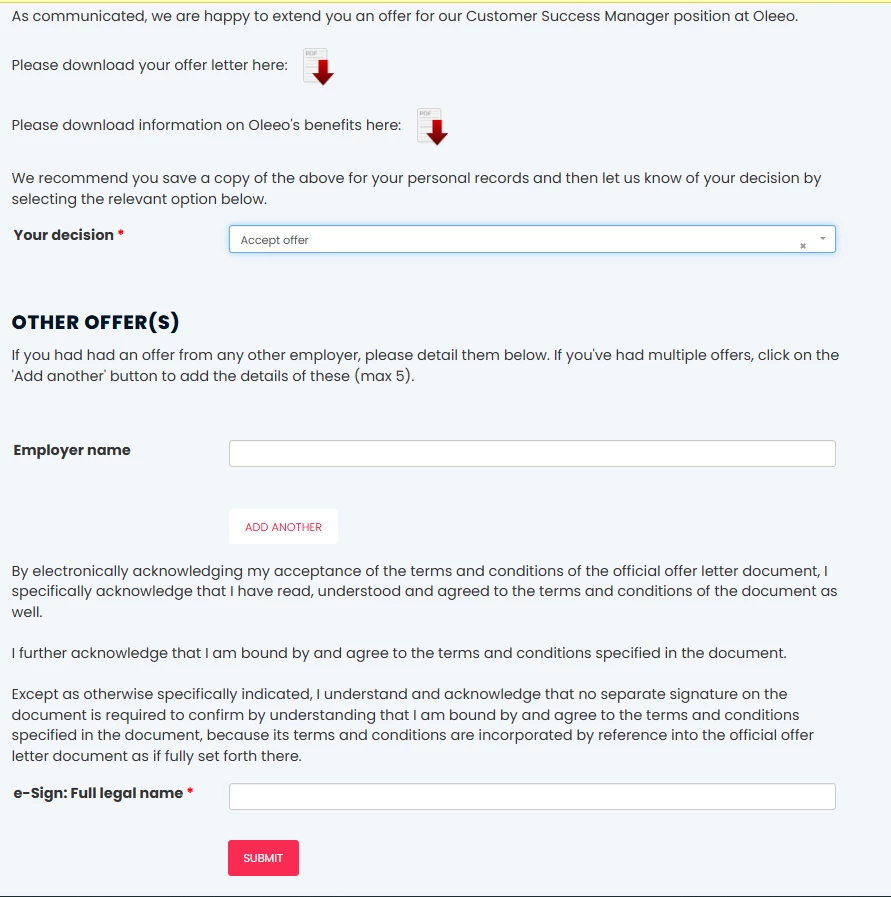
💡 Using an offer acceptance form, you can capture an electronic signature from candidates.
The form can include:
-
Download links for the offer and contract documents, so candidates can review and save them.
-
A field for candidates to indicate their acceptance decision.
-
A dedicated e-signature field for agreeing to the terms and conditions.
As with all Oleeo forms, the offer acceptance form can be tailored to your specific needs.
Important: To ensure the signature is legally binding, we recommend seeking advice on the appropriate wording for your form.
📌 Pro Tip: A document upload item can be added to capture an electronic version of the wet signature page of the document.

📌 Pro Pro Tip: A label can be added to the bottom of the form, including a datapath such as ‘application.form_sessions.form:XXXX:submitted:1.submitted_date’ (replace XXX with the Form ID) to populate a timestamp of when the form is submitted, or essentially the timestamp the form was signed.

🔧 Use case: An organisation does a lot of overseas or national recruitment and waiting for copies of documents to be mailed or posted back and forth is resource intensive and slowing the process down.
Option 2: Automatically capture recruiter and candidate signatures
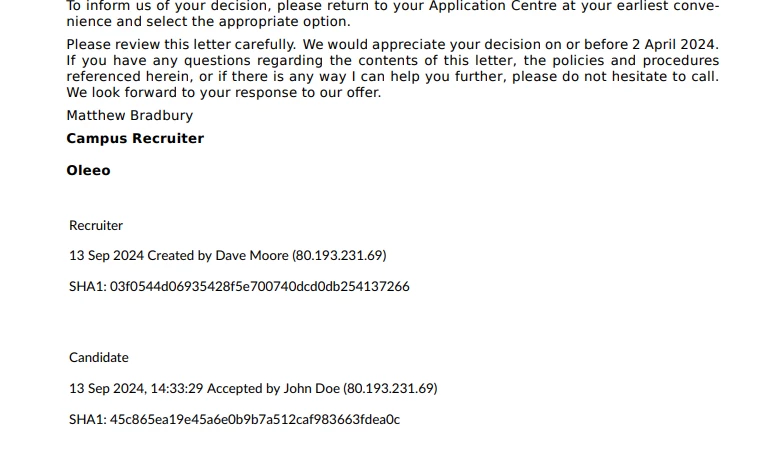
💡 Oleeo can automatically generate a signature on letters created within the ATS.
This includes:
-
The date and time the document was created.
-
The name of the recruiter and candidate who generated the document version.
-
The associated IP address.
This approach provides a clear audit trail, giving Legal teams confidence that the document is traceable and can be considered legally binding for both the candidate and the recruiter.
🔧 Use case: An organisation would love to accept electronic signatures and is very compliance focused and prefers a clear audit trail for peace of mind.
Option 3: Integrate with Docusign
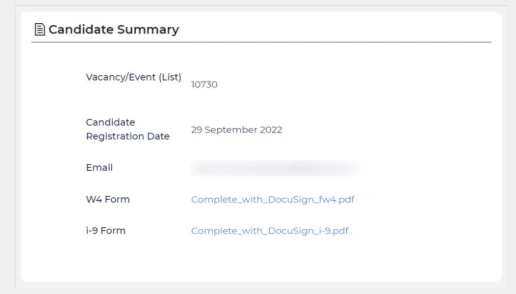
💡 With Oleeo’s DocuSign integration, recruiters can manage the entire document signing process without ever leaving the ATS.
-
Automatically trigger DocuSign invitations when a candidate’s status changes.
-
Enable candidates to complete and sign onboarding documents quickly and securely.
-
Take advantage of DocuSign's pre-populated library of templates including I9 and W4.
-
Create templates for standard forms such as onboarding forms that all employees complete.
-
Store all completed documents in one central, secure location within Oleeo.
This seamless process helps you stay on top of onboarding progress while ensuring every signed document is easy to access and legally compliant.
🔧 Use case: For organisations that require all new hires to complete the same forms like I-9, W-4 HMRC New Starter checklist or standard terms and want to simplify the process.
😊 How much time and paper would being able to capture electronic signatures save your team?
BENEFITS
- Seamlessly capture the end to end recruitment process all in one place.
- Improved time to hire.
- Less resources to manage paper offer letters and contracts.
CONSIDERATIONS
Option 1: Offer form
- Can be configured via self configuration level 1.
- May require advice on the binding nature of the electronic signature and wording of the acknowledgement.
Option 2: Automatic signature generation
- Requires Oleeo change request to implement.
- There is a cost per signature, per letter template.
- May require advice on the binding nature of the electronic signature.
Option 3: Docusign
- Customers require a separate contract with Docusign.
- Works for templated forms that a number of candidates would complete.
- Does not work for customised offer letters.
COSTS
Please refer to the Considerations section above.
NEXT STEPS
Speak to your Customer Success or Commercial Manager
ADDITIONAL INFORMATION:

