




Tip Tuesday! Report Hub history, snapshots and more!

WHAT IS THE TIP?
💡Looking for greater visibility and auditability over your recruitment reporting? The Report Hub has received a major UI/UX enhancement! The updated History tab now delivers a comprehensive, uniform audit log across your reports. You can instantly track exact timestamps of report modifications, see who made changes, confirm when scheduled distributions were sent, and access direct links to point-in-time historical snapshot reports.
Tracking Edits & User Auditing
💡Gain full visibility into modifications made to your custom and standard reporting configurations.
-
Navigate to Report Hub from your main navigation menu.
-
Locate and open the specific report you wish to inspect, then select the History tab.
-
Select Edits from the categories, this will restrict the list to only show when edits were made.
-
Review the chronological audit log showing exact timestamps and user details for every edit made to the report criteria, filters, or layout.
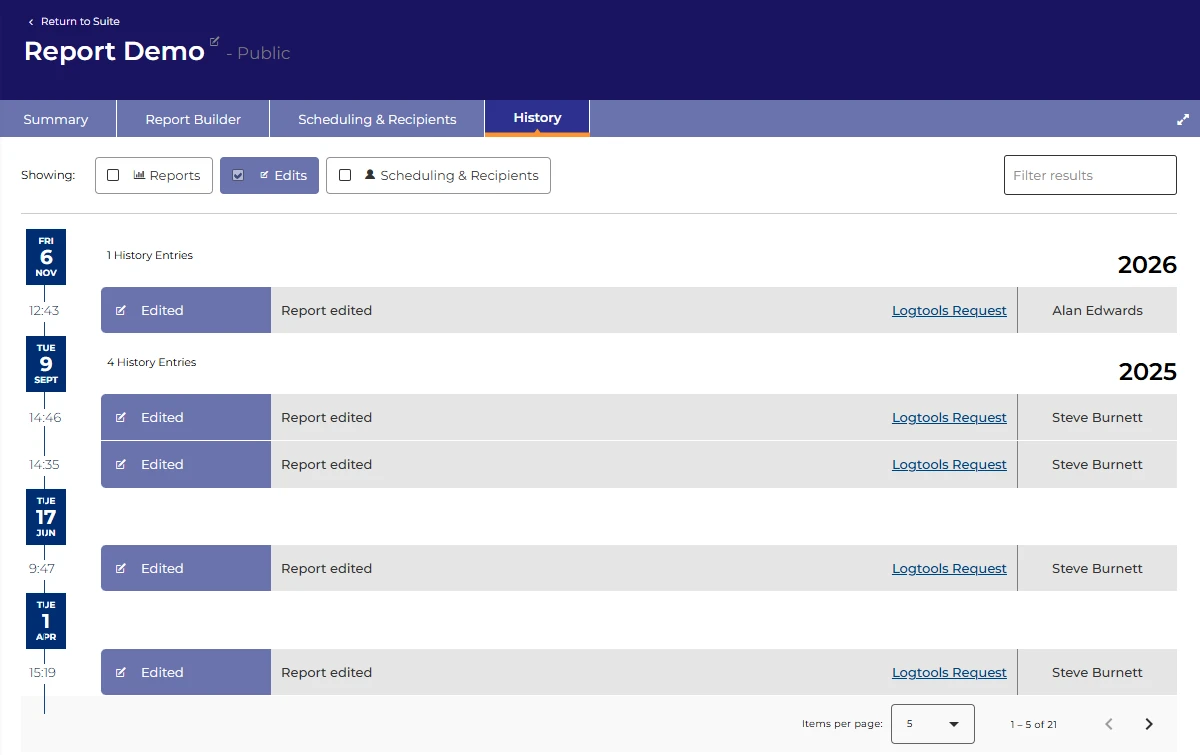
🔧 Use case: A key compliance report's filtering parameters were changed, altering your candidate pipeline numbers. Instead of raising an internal query or submitting a support ticket, your reporting lead checks the History tab to see exactly who edited the report and when, making collaboration and governance seamless.
Scheduled Distribution Logs
💡Verify automated delivery schedules and ensure stakeholders receive crucial hiring metrics on time.
-
Within the report’s History tab, select Reports and Scheduling & Recipients from the categories.
-
Scroll to the Report or Sent sections.
-
Check the timestamp log to confirm when scheduled report batches were successfully sent to and accessed by recipients.
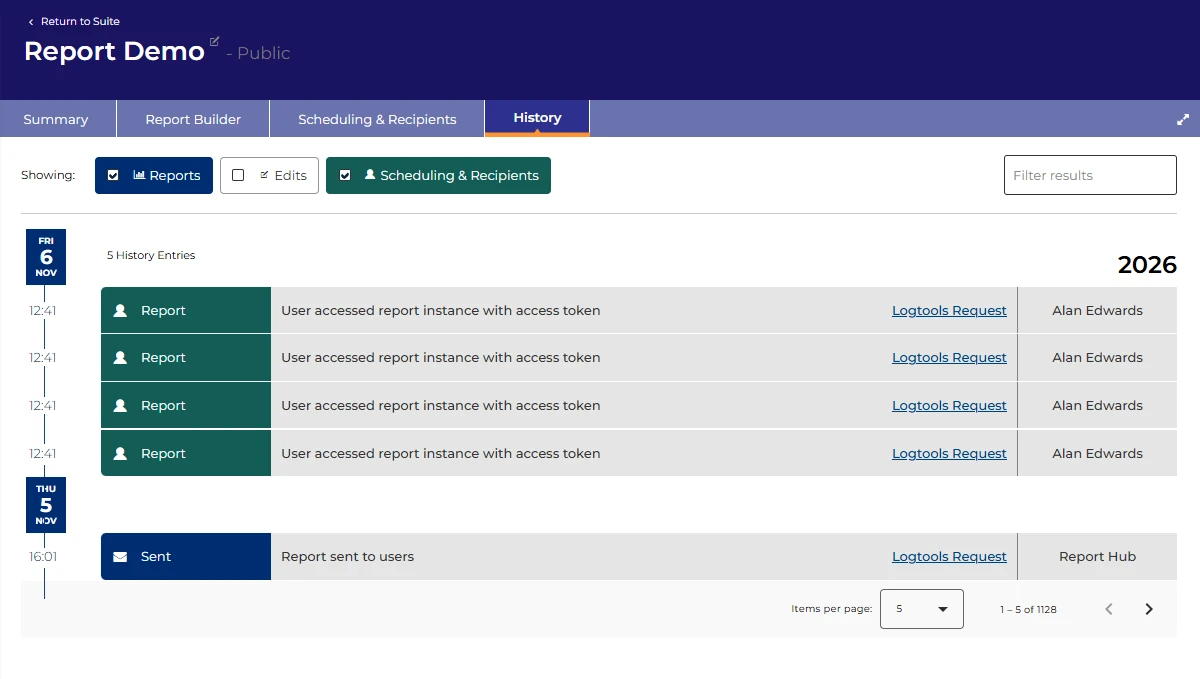
🔧 Use case: Your leadership team asks whether the Monday morning executive hiring summary was dispatched as planned. You open the report, click History, and can confirm the exact date and time the scheduled run executed successfully.
Historical Snapshot Viewing
💡Access past data as it stood at the moment of execution without altering current live datasets.
-
Open the History tab on any report that has scheduled dispatches enabled.
-
Locate the specific scheduled run in the timeline list.
-
Click the Snapshot Link associated with that run to view and review the exact historical data captured during that distribution.
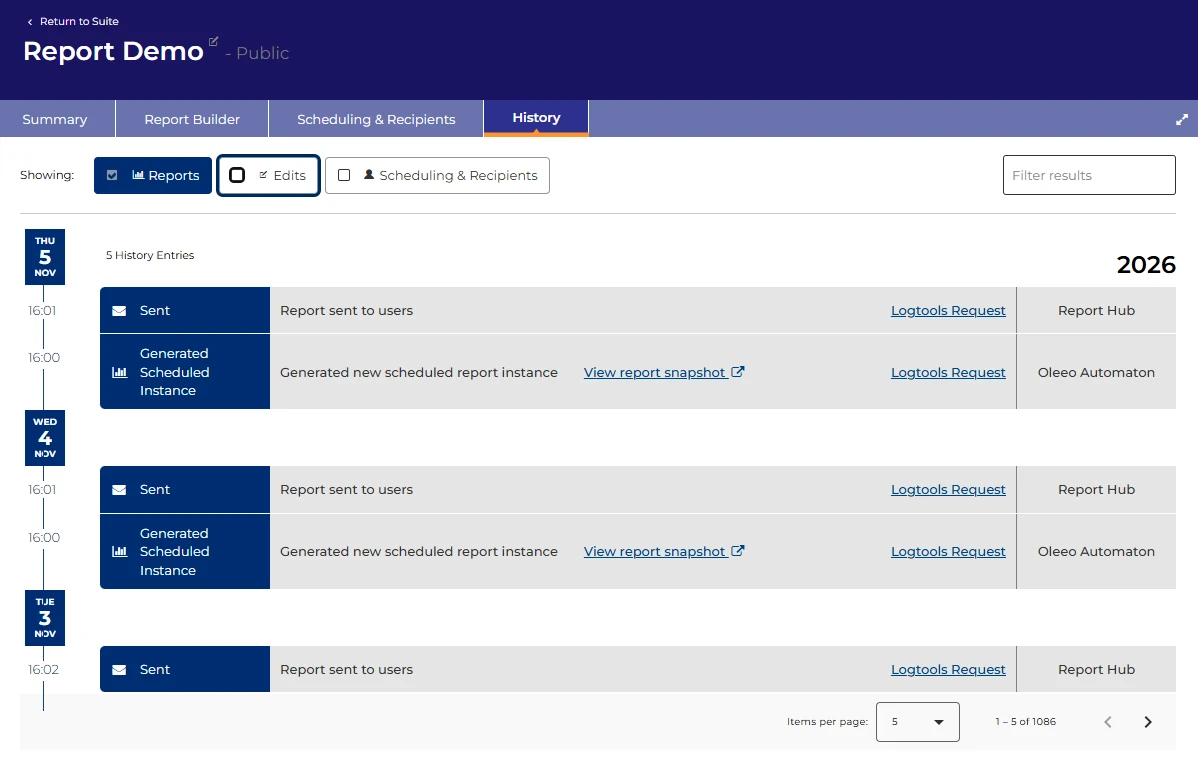
🔧 Use case: You need to verify candidate pipeline stages from the end of last quarter for an external audit. Rather than manually reconstructing past figures, you click the snapshot link from the corresponding quarter-end dispatch to view the exact archived report view instantly.
😊 How will your team use the enhanced History tab? Share your reporting tips in the comments below!
BENEFITS
-
Complete Auditability: Clear tracking of who made changes and when ensures strict governance and compliance across high-volume recruitment operations.
-
Point-in-Time Visibility: Direct links to historical snapshot reports allow you to easily verify historical figures without complex data recreation.
-
Modernised UI/UX: A standardised, intuitive layout that brings uniform historical tracking across the platform.
-
Self-Service Verification: Easily verify scheduled dispatches and report alterations independently without contacting support.
CONSIDERATIONS
-
User Permissions: The enhanced History tab is accessible to all users with existing permissions to view and manage reports within the Report Hub.
-
Snapshot Availability: Historical snapshot links reflect scheduled report dispatches; ad-hoc runs run in real-time and will not generate a static scheduled snapshot link.
-
System-Wide Rollout: This interface is part of an ongoing initiative to deliver consistent UI/UX historical audit tracking across various product areas in the platform.
COSTS
This enhancement is a standard core platform update and is available to all users with Report Hub access at no additional cost under your existing subscription.
NEXT STEPS
Log in to your ATS instance, navigate to the Report Hub, and open any report to explore the new History tab and snapshot features today.
ADDITIONAL INFORMATION