




TIP TUESDAY! Quick Clicks, Long Consequences: Using the ‘Other Status’ Tool Wisely

WHAT IS THE TIP?
💡The ‘Other Status’ tool is tempting, but it must be used wisely, sparingly and only by those who truly understand its impact.
In this tip, we’ll guide you on when to use it and when to avoid the ‘Other Status’ option to manage your candidates.
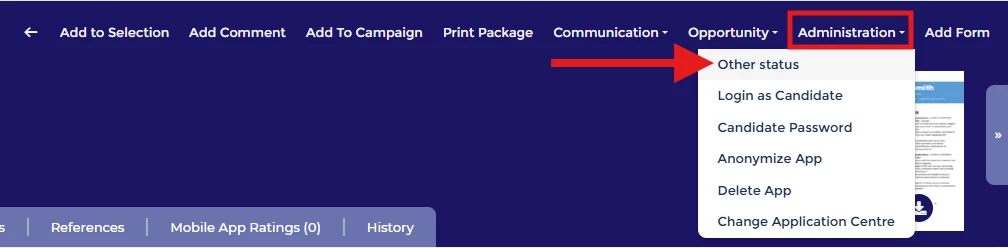
When NOT To Use It
💡 Be extra cautious if using the 'Other Status' tool to skip stages!
We’ve all been there: the workload is stacking up and you want to shave off every second possible. It seems harmless to save a few clicks by skipping straight to the desired stage - but tread carefully! Your system is built with multiple "hidden" actions triggered by the standard process flow. Bypassing these can cause a domino effect of issues:
-
Flag Failures: Flags may not trigger, stalling future recruitment tasks (for example Apply Flags affecting things like Right to Work checks).
-
Skipped Safeguards: Essential stages like duplicate checks or sifting may be bypassed, leading to a poor candidate experience and an administrative burden to rectify errors later.
-
Broken Automation: Candidates may miss important correspondence, and background tasks like Autoscores can fail to run.
-
Inaccurate Reporting: This directly impacts funnel reports, cumulative journey data, time-to-hire metrics, and can also impact some saved searches.
🔧 Temptation: I have a candidate who I have spoken to before and I know they would be a really good fit for the role, I want to add them to this vacancy and move them straight to the 2nd stage interview stage so my colleague can have a chat with them.
BUT
💣 The potential impact: I hadn’t realised that they were already in the system and so now I have a duplicate record for that same candidate. I have also skipped the anonymisation trigger meaning that now my candidate’s details will not be anonymised as per our policy which is a breach of GDPR. Plus this will impact the reports that my senior leadership team review every quarter. I will also see some issues at the pre-employment stage because the apply flag has not been set.
What If My Process Doesn’t Reflect What I Need To Do?
💡 Reach out to your Oleeo Super User. They understand the "logic beneath the surface" and can advise you on the impact of a move. They can also record the need to update your process flow to allow for that specific route in the future.
📌 Pro Tip: You can restrict access to this functionality - lock the option down so only specific profiles, such as Super Users, can use the ‘Other Status’ tool.
How About When Testing - Can I Use It Then?
💡 Use carefully! Best practice for system testing is ensuring your test data is "clean." If you move historic candidates using ‘Other Status,’ you aren’t getting a true reflection of the live environment (e.g., autoscores might already be set from previous tests).
When CAN I Use It?
💡 Use this tool when a candidate needs to amend their application form (e.g., they missed vital info) or when a genuine mistake was made during progression.
🔧 Use case #1 (Corrections): I have been contacted by a candidate who has submitted an application, but they have made a mistake on their form which they would like to correct. I will use the other status functionality to move them back to the very first process status (often called Application - Start or Application Started - Not Submitted). This allows them to log into their portal and resubmit.
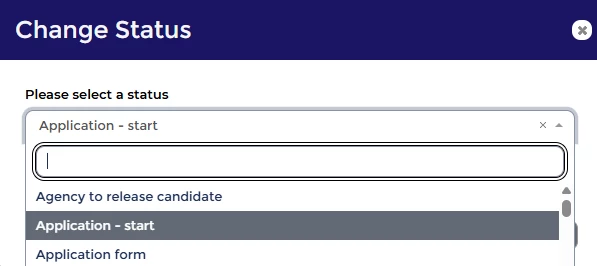
⚠️ IMPORTANT: When using this tool, you will have the option to select ‘Run Automatic Actions’. Most of the time you will need to make sure that this is ticked to ensure background triggers are activated. If this is forgotten, then hidden potentially important actions will not run.
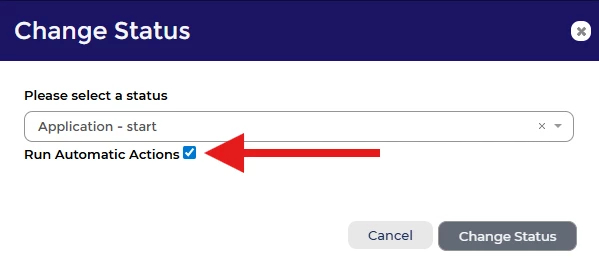
🔧 Use case #2 (Accidental Withdrawals): A candidate has contacted me because they accidentally withdrew their application but still want to be considered. I can check the application history and then use the ‘Other Status’ functionality to move them back to their previous status.
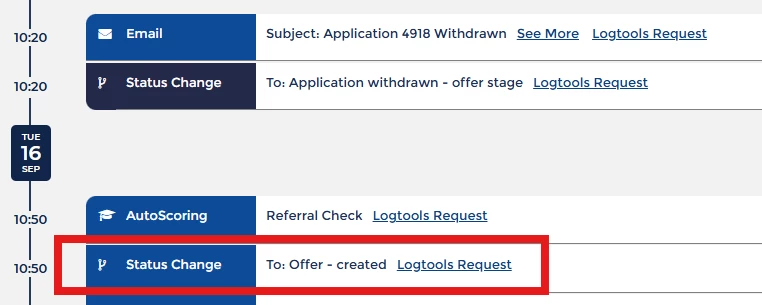
📌 Pro Tip: We would always recommend communicating with the candidate before making these changes to keep them updated and let them know what to expect.
📌 Pro Tip #2: You can also add a note to the history to explain why the ‘Other Status’ tool was used.
💡 The Exception, Not the Rule: Super Users should only use this for ‘fringe events’ that the current process doesn't support - but this needs to be done with caution. Thought should then be given to whether updates need to be made to the process flow to encompass this path in the future.
BENEFITS
Allows for the correction of human error and allows candidates to edit submitted data.
CONSIDERATIONS
- Who should have access to be able to use this tool?
- What background actions will be bypassed?
- Is the need a one off or a matter of habit? If the latter then a process review would need to be considered.
COSTS
This feature is part of the standard product offering.
NEXT STEPS
Ask your Oleeo Supported User(s) to speak to our Support Team for advice if you are unsure of when to use this feature.
Alternatively reach out to your Customer Success Manager and/or our Change Team via a Change Request for guidance on how to update your current process.
ADDITIONAL INFORMATION:

