




TIP TUESDAY: One Update, Every Template - The Power of Placeholders

WHAT IS THE TIP?
💡 Use placeholders to store reusable text – like team email addresses, signatures, or standard messaging - that you can insert across email templates, status messages, letter templates, contracts, and even some system labels. If the text ever changes, just update the placeholder and it updates everywhere it’s used. No more hunting through dozens (or hundreds!) of templates.
Create a placeholder for your team email address
💡 Placeholders are brilliant for standardised text that appears in multiple templates. For example, instead of hardcoding recruitment@company.com into 35 email templates, create a placeholder like [placeholder="team_email"][/placeholder]. That way, if your email address changes, you won’t have to update every single template - just the placeholder itself.
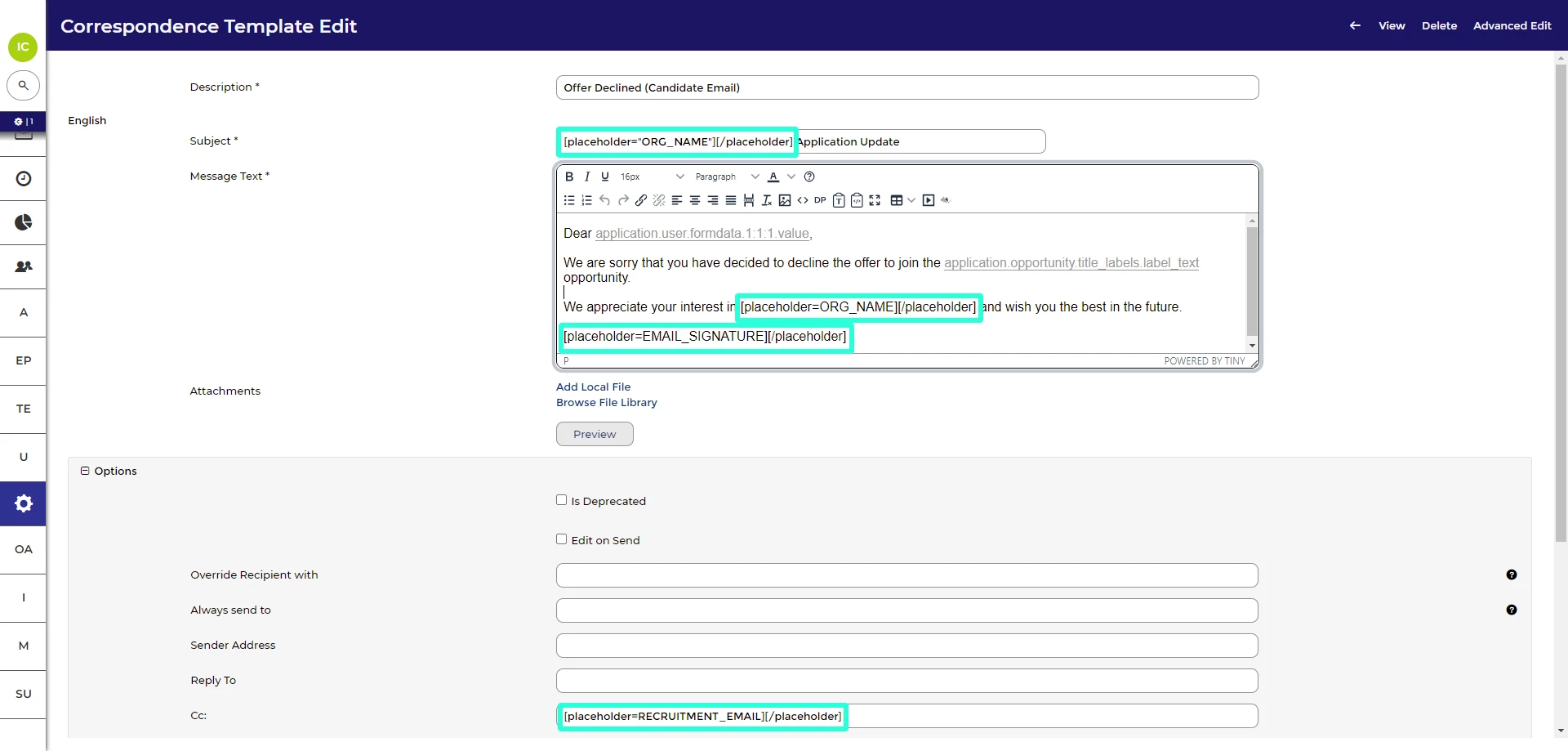
🔧 Use case: Your organisation has rebranded and your contact email is changing from jobs@oldbrand.com to talent@newbrand.co.uk. A single placeholder update does the work of 50 template edits in one go.
Use placeholders to manage your standard recruiter signature block
💡 Adding your standard closing as a placeholder helps keep messaging consistent across all touchpoints - and makes updates a breeze. For example, a sign-off like “Kind regards, The Recruitment Team” or links to your help centre can be quickly added or updated in one place, rather than editing every template individually.
📌 Pro Tip: Use formatting in the rich text editor to include styling (bold text, links, spacing) so your signature looks professional wherever it's used.
🔧 Use case: You want to highlight your new career site in all applicant communications. By updating your standard_signature placeholder, you can instantly include the link in all messages without manually editing each template.
Think beyond just emails - placeholders also work in letter templates, status messages, and some system labels
💡 Placeholders aren’t just for emails. They’re a time-saving secret across your whole workflow - from status updates like “Application received” to standard paragraphs in contracts or onboarding documents. If your wording is repeated across multiple areas of the system, using a placeholder means it’s consistent and easy to update.
For example, If you're using contracts or offer letters that include things like a standard working hours statement, equal opportunities wording, or onboarding steps - placeholders are your friend. You can add reusable text blocks into your templates, which helps you maintain consistency and quickly update your policies in one go when they change.
🔧 Use case: Your legal team updates the standard clause around probation periods or notice periods. Instead of editing 12 contract templates, you update the placeholder and it's sorted everywhere - no missed updates, no outdated documents.
📌 Pro Tip: Use clear, descriptive placeholder names like [placeholder="contract_probation_clause"] so it's obvious what each one is used for - especially useful in teams with multiple admins.
Keep the placeholder name simple, clear, and consistent
💡 When you create a placeholder, you’ll need to give it a Unique Identifier (that’s the bit in square brackets, like [placeholder="company_signature"]). Keep this short and logical so that it's easy to reuse - and once it’s set, avoid changing it unless absolutely necessary. Use underscores instead of spaces (e.g., company_signature, not company signature) - this helps ensure the system reads the placeholder correctly.
If you rename a placeholder, you’ll need to manually update every place it’s been used. That’s fine if you’ve only got a few - but risky and time-consuming in a large configuration. Save yourself the hassle by getting the naming right from the start.
😊 Got a great use case or a naming convention that works well for your team? We’d love to hear it!
BENEFITS
- Saves hours of admin time - update once, not 100 times
- Ensures consistency across your candidate communications
- Reduces room for error (especially during high-volume campaigns)
- Easy to maintain even in multi-language systems
CONSIDERATIONS
- Placeholders don’t support datapaths, deep links, images or conditional logic, so stick to static, reusable text
- Avoid changing the Unique Identifier after the placeholder is in use - it will break existing links
- For multi-language systems, review each language tab if the placeholder is used globally
COSTS
This feature is available with level 1 configuration.
NEXT STEPS
-
Speak to your Customer Success Manager if you'd like help setting up or auditing your existing placeholders
-
Raise a case to our Delivery team if you'd like to explore placeholder use in contracts or more advanced templates
ADDITIONAL INFORMATION:

