




TIP TUESDAY! Mastering Duplicate Detection in Oleeo

WHAT IS THE TIP?
💡 Duplicate accounts can degrade your data quality and disrupt the recruiting process. Maintaining a single profile per candidate is essential for accurate reporting, seeing a complete candidate history, and preventing different areas of the business from competing for the same person. Here is how you can use Oleeo’s duplicate detector to keep your database clean and your hiring process fair.
How Duplicate Detection Works
💡The purpose of the duplicate detector is to identify if a candidate has created a new account, using a different email address, to submit an application. Once a candidate submits their application, the duplicate checker identifies potential duplicates by comparing the new account details against prior applications.
During system implementation, specific duplicate criteria and the threshold to flag an application as a duplicate, would have been agreed. Common application fields that are compared are:
- First Name or Last Name
- Mobile/Cell number
- Address
- National Insurance Number
- Current University
📌 Pro Tip: Check with your Super User or System Admin to understand what criteria the duplicate detector is comparing.
Duplicate Management
💡 To prevent backlogs and keep candidates moving forward, address flagged applications quickly. Again, the quicker and more regularly duplicates are managed, the cleaner the data and the less daunting the task later on in the process.
Please refer to our User Guide for a step-by-step guide on reviewing and comparing potential duplicates.
Once an application is determined to be a duplicate and the red ‘Reject’ button is clicked, there are a number of factors to consider.
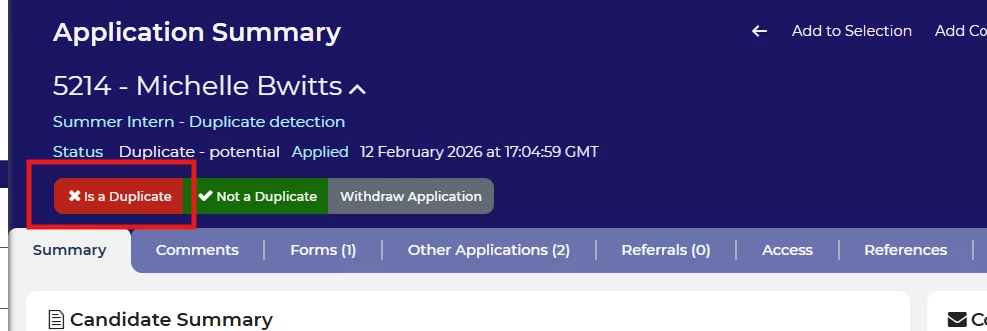
- Identify the original account: Which account did the candidate create first? This will typically be in a status OTHER than “Duplicate - Potential”.
- The goal is to identify and then merge all applications into the original account so there is only one active account for each candidate.

- Target the Lowest App ID: if there is more than one application to confirm a duplicate against, the original account created by the candidate usually has the lowest application ID number.

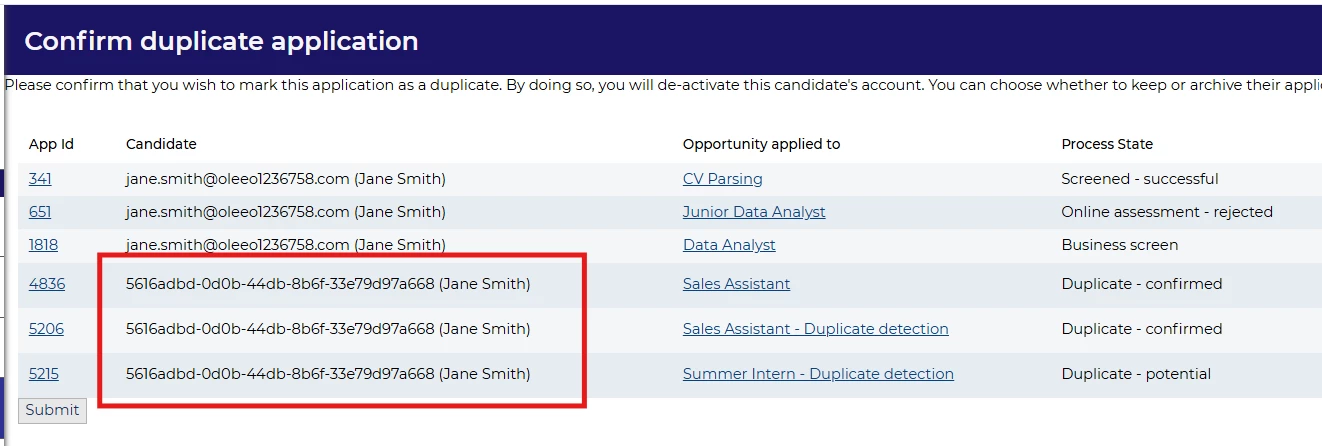
- Watch for Scrambled Candidate Names: A name consisting of random characters (e.g., a1b2c3d4) indicates a record that is already a confirmed duplicate.
-
Handle Multiple Accounts: If all applications listed are in "Duplicate - Potential" status, the candidate likely has more accounts. Start the process by opening the earliest application in this status.
-
Go through the same process as above until the original account is identified.
-

- Check the Process State: Ensure the original account is in a valid state, such as "New Application" or "Screening". If the state is already "Duplicate," it is likely the wrong record.

Once you have identified an application from the original account, click the link for ‘Confirm duplicate’ next to it.
📌 Pro Tip: Always link back to a clean, legible account.
📌 Pro Tip: NEVER confirm an application is a duplicate of a confirmed duplicate or potential duplicate.
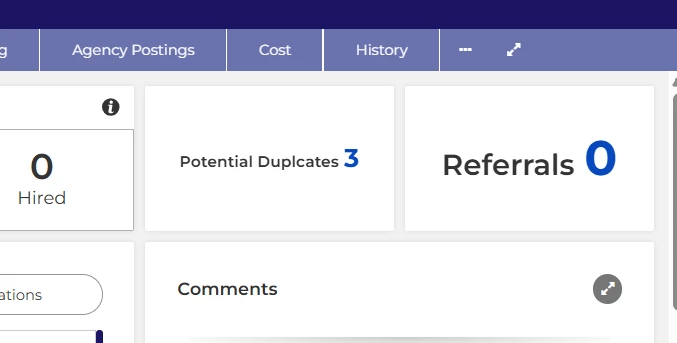
📌 Pro Tip: Keep on top of duplicates by adding a Big Number widget to your vacancy dashboard to take you straight to the list of potential duplicates within the vacancy.
Keep, Reject or Reassign?
💡Once the “Confirm duplicate” link is clicked next to the the original account, you will need to decide how to progress with the active applications in the duplicate account(s).
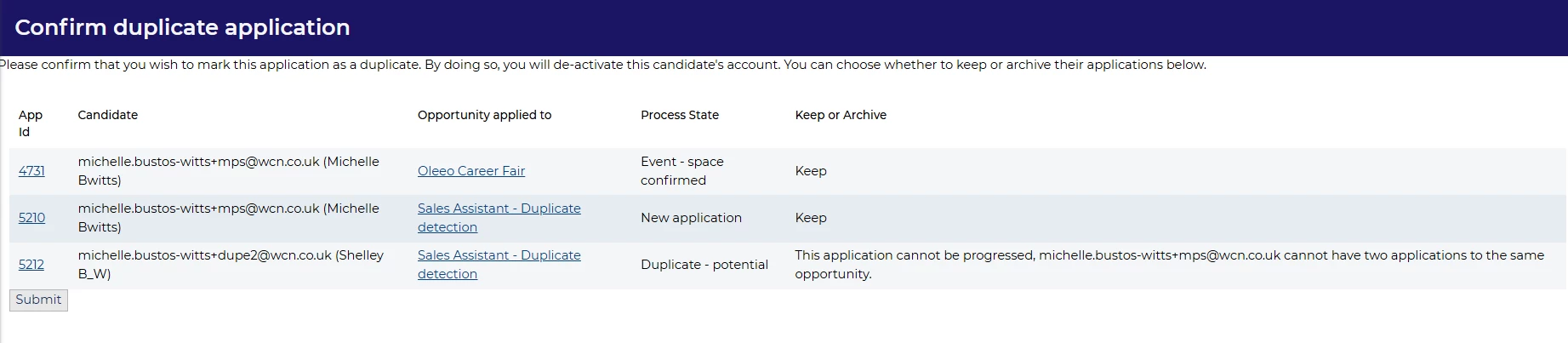
The system lists all applications attached to the original account and all the applications attached to the account in question. You must now decide which to keep, reject/archive, or reassign.
The system will make suggestions based on what it believes to be the original account as well as any duplicate applications to the same vacancy.
- Review the suggestions the system has made taking note that the applications to “Keep” are aligned to the original account and the duplicate is being archived as an application has already been submitted for the vacancy.
-
If the duplicate applications are relating to a different vacancy then the decision will need to be made as to if it should be rejected/archived or reassigned to the original account.
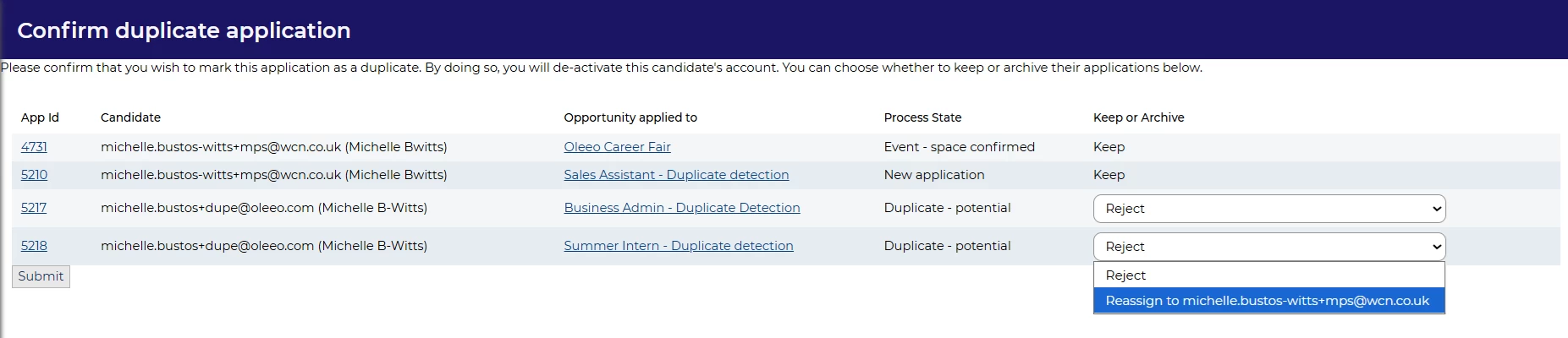
- Application Limits: if your organisation has limits to the number of applicators that can be submitted then this will need to be factored in when making a decision to “Reject” or “Reassign” the duplicate.
Once all actions have been determined, “Submit” to finalise the actions.
⚠️ Important: Once an application is confirmed as a duplicate, it cannot be reversed.
Candidate Experience
Applications that are reassigned will be merged with the original account.
- When a candidate logs into their merged account, they will have access to all the applications made using both accounts apart from the applications that were rejected during the merge process.
- The candidate can log in using both the email addresses associated with their original account or the new email address.
- To access the merged account, they should use the password from the original account.
- If the candidate has forgotten their password, they can request a password reset from the login page.
- Please note that the reset details will be sent to the email address registered with their original account.
BENEFITS
- Accurate Reporting: Guarantees reliable data for metrics and analysis.
- Complete Candidate History: Provides a full, centralised view of the candidate's application history and current status.
- Stop Internal Competition: Prevents different areas of the business from competing for, or unknowingly offering jobs to, the same person.
- Quality Control: Allows us to enforce application limits, ensuring candidates apply only to roles of genuine interest.
- Fair Process: Ensures all applicants experience a fair and inclusive opportunity to join their preferred program.
CONSIDERATIONS
- Duplicate detection does not work across job boards, so If an applicant applies from the internal job board and then applies again from the external job board, then the duplicate will not be flagged.
- For global organisations with regional profile access, there will be limited visibility to compare or action duplicates in differing regions.
COSTS
This feature is included as standard during implementation.
Any changes would require submitting a Change Request to the delivery team.
NEXT STEPS
Raise a case to our delivery team to make any changes.
ADDITIONAL INFORMATION:

