




TIP TUESDAY! Make the Most of Your Candidate Summary

WHAT IS THE TIP?
💡 Do you find yourself digging through candidate forms and history to track down the details you need? Customising the Candidate Summary within the Application view pulls key information into one place – whether that’s internal vs external status, vetting outcomes, or the last generated letter. By using either a simple table layout or a dynamic display form, you can cut down on clicks, save valuable time, and give recruiters instant context exactly when they need it.
Review key details with table layouts
💡 The Candidate Summary when driven by a table layout gives every user the same overview of vital candidate info upfront, helping recruiters move faster and make more informed decisions. You can edit the ‘Application Summary’ layout in the Global Table Layouts section of your configuration environment to make this more relevant and flag need to know information.
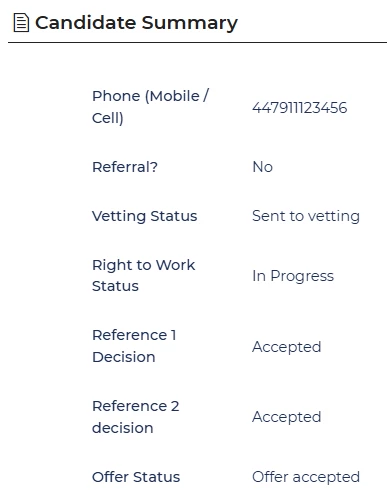
🔧 Use case: I’m managing a campaign with hundreds of applicants, each needing pre-employment checks like vetting, references, and Right to Work checks. Instead of opening multiple forms or searching through history, the Candidate Summary shows me the status of each check straight away. This means I can quickly identify who is ready to move forward and who still has actions outstanding – saving time and keeping the campaign on track.
Make the summary dynamic with a display form
💡 Want the summary to adapt based on who’s viewing it or what kind of role it is? Switch to using a display form instead. This allows you to apply all your normal form rules – visibility conditions, role-based fields, and more.
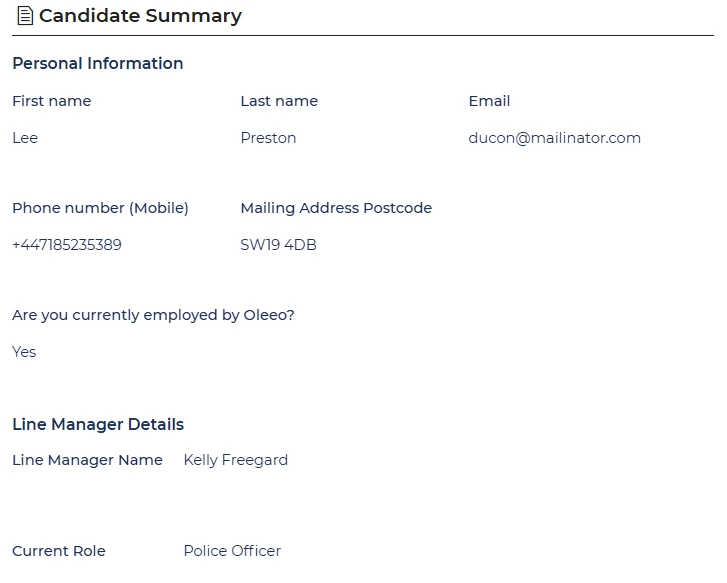
📌 Pro Tip: You’ll need Oleeo to switch on a config key to enable this – but other than that, it’s fully self-configurable (if you have config access). Just create a new form that is Purpose = Display.
🔧 Use case: My vacancy has attracted internal applicants, and I need to see their current role and Line Manager so I can follow up on performance ratings. With a dynamic form, this information is surfaced straight away. For external candidates, details like notice period, salary expectations, and right to work status are far more relevant than internal performance data. The dynamic form ensures I see the right details for each candidate type, keeping the summary focused and role-appropriate.
😊 Already using candidate summaries in a clever way? Share your ideas in the comments – we’d love to hear what information you have flagged to help improve efficiencies.
BENEFITS
-
Gives recruiters an immediate view of key candidate info
-
Reduces time spent searching in history or other sections
-
Highlights important status flags at the right time
-
Tailors the experience based on role, team or campaign
-
Easily configured by self-service users
CONSIDERATIONS
-
Table layouts show the same fields to everyone – fine for consistency, but not role-specific
-
Display forms require a config key to be enabled by Oleeo
COSTS
Configuration costs if you do not have level 1 configuration access
NEXT STEPS
-
Speak to your Customer Success Manager
-
Raise a case to our Delivery Team if you’d like the display form config key enabled

