




TIP TUESDAY! Keep on scrollin' through records effortlessly

WHAT IS THE TIP?
💡 Got a long list of applications, candidates, events, or talent pool vacancies to review? Use the scroll arrows to easily navigate between records without needing to go back and forth!
Scroll Arrows - How to Use Them
💡 These magic arrows often fly under the radar but can save you loads of time when reviewing multiple records. Here’s how to use them:
- Run a search for the records you want to review.
- Click into the top result - this will open the individual record.
- Once the record is open, you’ll see a blue header containing the record details. On the right side, you’ll notice an arrow - click it to scroll to the next result in your list.
- When you're on the second result, you'll also have an arrow on the left-hand side to scroll back, allowing you to move back and forth between records effortlessly.
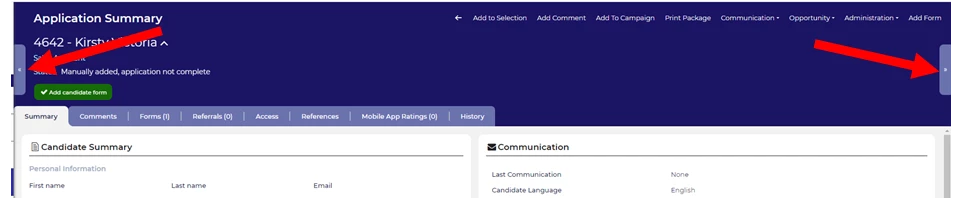
🔧 Use case: When shortlisting a number of applicants, use the arrows to quickly navigate through the list without having to return to the main search results. It ensures you don’t miss out on any candidates!
😊 Give the scroll arrows a try the next time you’re shortlisting! Have any time-saving tips of your own? Share them with the community!
BENEFITS
- Efficiency Boost: Much quicker to move through a list than returning to the bulk list after reviewing each record.
- Seamless Navigation: Easily review applications or records in sequence without unnecessary clicks.
CONSIDERATIONS
Make sure to complete your search properly to ensure the arrows appear when you’re navigating between results.
COSTS
This feature is part of the standard product offering.

