




TIP TUESDAY: Grouped Searches, For When a Normal Search Just Won't Do!

WHAT IS THE TIP?
💡Tired of wrestling with related questions in your applicant searches? What if you could effortlessly connect related criteria and filter your talent with laser precision? Discover how our Grouped Search feature can unlock a faster, simpler way to find the perfect candidates – keep reading to see how!
Filtering the applicants you do or don’t want to see can be a complex task, with the “Group/Grouped with another criterion” option you can seamlessly link connected items together to enhance your search capabilities. With so many options to choose from, you may sometimes wish you could filter another way to re-define your overall results. With the “Group/Grouped With Another Criterion” options, help is at hand.
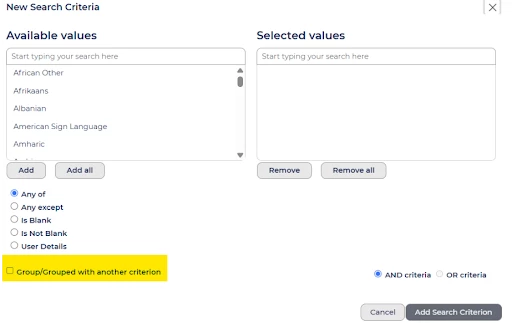
Grouped Search
💡Instead of creating separate search criteria for each instance where you have linked questions, Grouped Search allows you to join them together.
Grouped Search is an advanced option of including or excluding values to create one combined search element. This is best suited to situations where you have an initial question with a follow up question linked to it.
🔧 Use case: If you're trying to narrow down your candidate search by both the language(s) spoken and the level of proficiency, “Grouped Search” allows you to combine these criteria into one powerful search query.
For example, if you're looking for candidates who speak specific languages and have a certain level of fluency, you can group the "Languages Spoken" question with the "Language Proficiency" follow-up question. This will give you a more precise set of applicants who meet both conditions.

Advance search box open with Languages and Language Proficiency inked
Grouped With Another Criterion
💡 This feature is used when you want to link together multiple unrelated items within the same area of an application to include or exclude from a search. This works well if you want to quickly identify multiple items that a candidate may or may not have.
🔧 Use case: If you're trying to refine your search by combining multiple criteria, such as applicants who speak specific languages, have a certain level of proficiency, and have attended an event, “Grouped Search With Another Criterion” allows you to easily combine these elements.
For example, you can search for candidates who speak English, French, and Spanish and are fluent in these languages, and have attended an event. This feature enables you to seamlessly combine linked or unlinked criteria, ensuring you capture the exact candidates you need by including or excluding records based on your requirements.

Advance search box open with Languages and Language Proficiency inked to Attended An Event
😊 We would love to hear how you are using these search features, what linked items are you now joining together to search on? Share your results with the community!
BENEFITS
- This is quicker than a normal search, you can target your search specifically against related criteria all at once.
CONSIDERATIONS
- If any of your look up lists behind these saved searches are amended, remember to update each search to include or exclude the new values.
- If using either option as a config saved search avoid using fix date options and instead use floating options e.g. records in the last 30 days.
- Both of these search types can be executed at a user level or saved as a config saved search.
- Searches like these that are saved as config searches are useful to ensure consistent results across a team.
COSTS
This feature is part of the standard product offering.
NEXT STEPS
Speak to your Customer Success Manager if you would like to learn more.
ADDITIONAL INFORMATION:

