




TIP TUESDAY! Dynamic Offer Letter Naming

WHAT IS THE TIP?
💡 Did you know you can make the names of your letters dynamic? By default, when you generate an offer letter or contract, the downloaded file name reflects whatever you typed in the Description field when setting up the letter. However, you can make this much more personal and easier to manage by simply updating the settings.
Using the Letter File Name field
💡 Instead of relying on the Description field, make use of the ‘Letter File Name’ field when setting up your Offer Letters and Contracts. This allows you to add datapaths, such as the candidate’s name or the opportunity title, so files are automatically named in a more meaningful way. Combine candidate name and opportunity title for maximum clarity: the below datapaths will work nicely:
[path]application.user.firstname[/path] [path]application.user.lastname[/path] - [path]application.opportunity.title_labels.label_text[/path] - Offer Letter
Reads as, for example: “Kate Scott - Sales Assistant - Offer Letter”
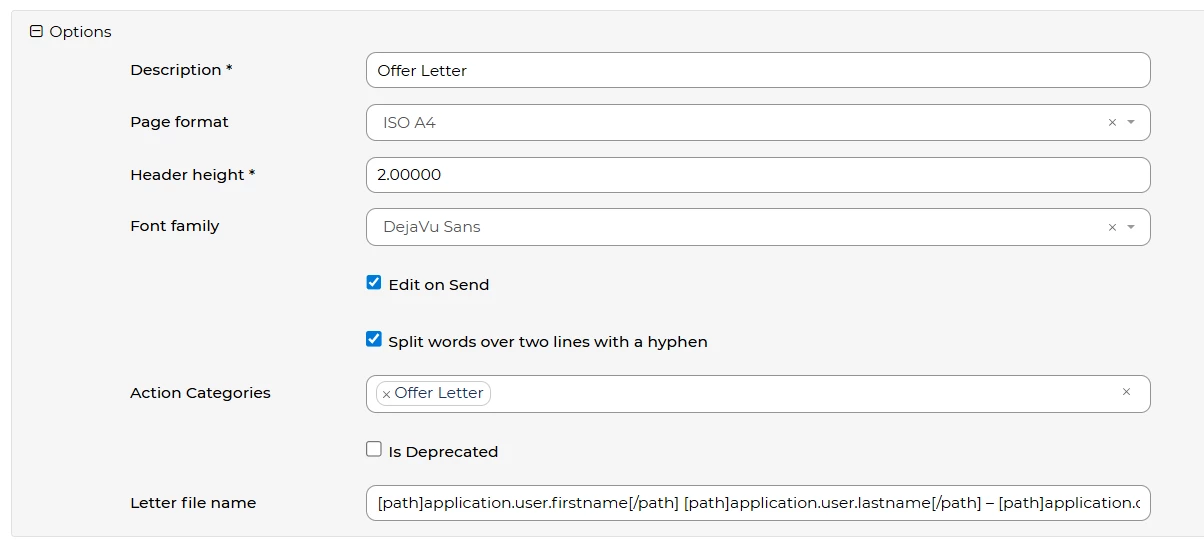

🔧 Use case: As a candidate, when I download my offer letter it’s called “Emily Taylor – Marketing Officer - Offer Letter” instead of a generic “OfferLetter.pdf”. It feels more personal and professional.
🔧 Use case: I’m a recruiter and need to export multiple offer letters from the system. Because I’ve set up the Letter File Name with the candidate’s name, each file now clearly shows who it belongs to, making it quicker to review and easier to store.
😊 Have you tried this yet? Share your favourite datapath combinations in the comments – you might inspire someone else!
BENEFITS
-
Makes exported letters instantly recognisable by candidate
-
Creates a more personal, polished experience for candidates
-
Saves recruiters time when reviewing or filing multiple documents
-
Reduces errors or confusion from duplicate or generic file names
CONSIDERATIONS
- Keep file names short and readable – avoid overloading with too many datapaths
- Always test your setup to make sure the file names display as expected
- Remember to consider GDPR when exporting information from the system
COSTS
This feature is part of the standard product offering.
NEXT STEPS
-
Ask your Customer Success Manager if you’d like support configuring datapaths
-
Review your letter templates and start updating the Letter File Name field
ADDITIONAL INFORMATION:

