




TIP TUESDAY! Don't let data retention slide.

WHAT IS THE TIP?
💡 With electronic applications, it's easy for data retention to become an afterthought since there are no physical piles of paper to manage. However, it remains just as important. In addition to Oleeo's auto-anonymisation and auto-deletion features, you can also manually anonymise and delete applications to help maintain compliance and optimise system performance.
Manual Anonymisation
💡 The purpose of anonymisation is to remove personal candidate information from an application whilst retaining key information about that application for reporting purposes.
- Via self configuration level 1, any form items that might contain personally identifiable information need to be set to ‘Anonymise’ within the item details.
- Personally identifiable information is considered a piece of information that points to a particular person.
- Examples include:
-
Full name
-
Home address
-
Email address
-
Phone numbers
-
National insurance number or Social Security number
-
Passport number
-
Driver’s licence number
-
Date of birth
-
Referee names
-
Referee contact details
-
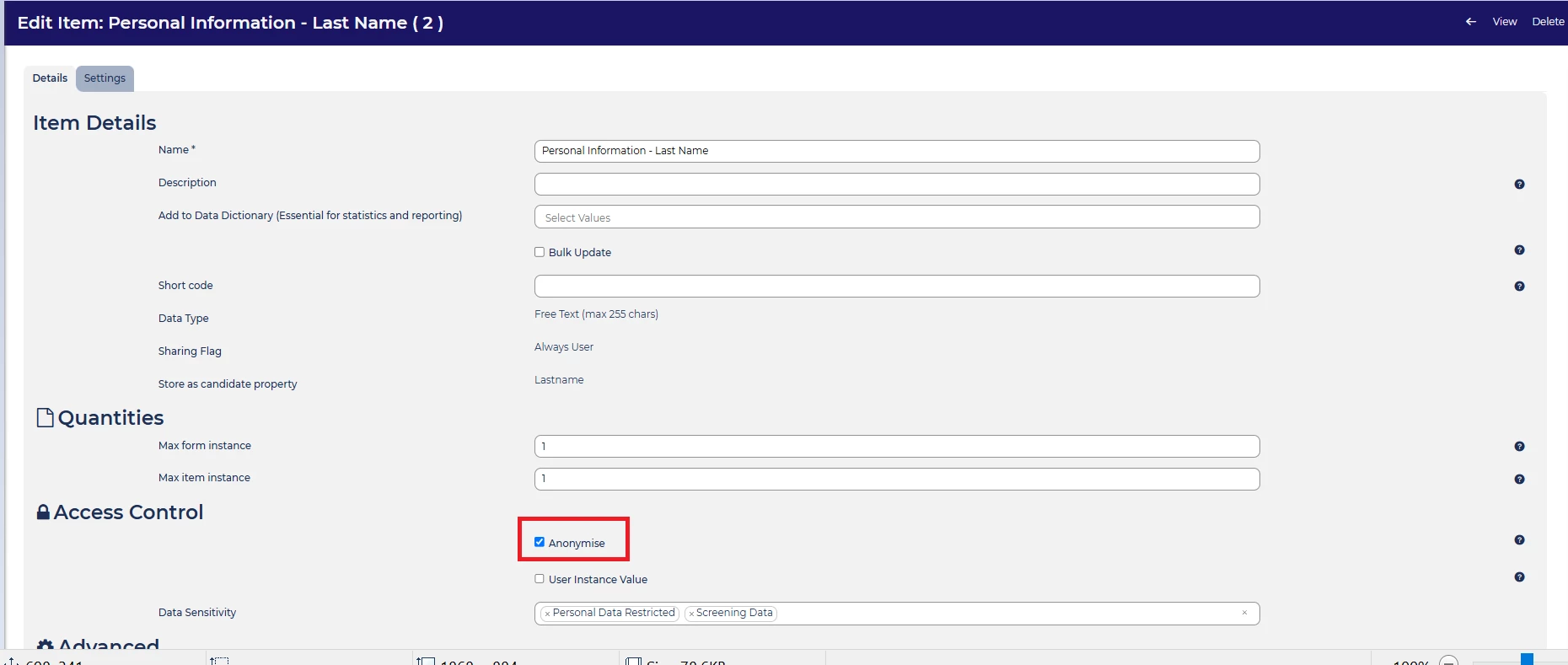
- Once all relevant form items are set to ‘Anonymise’ you will want to create a saved search to list all applications that meet your retention policy criteria.
📌 Pro Tip: If an item could not be linked back to a specific applicant than there is no need to set it to anonymise. For instance, if a question is ‘Do your have a drivers license?’ -> Yes/No, it would be unlikely to lead back to one applicant in particular so there is no need to set it to ‘Anonymise’.
🔧 Use case: If you do not have the auto-anonymisation feature and you want to ensure compliance with GDPR and/or your data retention policy, this is a low cost alternative.
Create a Saved Search
💡 Once all the relevant items are set to ‘Anonymise’, you will want to create a saved search to identify the applications that meet your retention schedule criteria.
Depending on your data retention policy, you will want to create relevant saved search(es). Consider making it public if more than one colleague will be managing the compliance.
Some suggested saved searches:
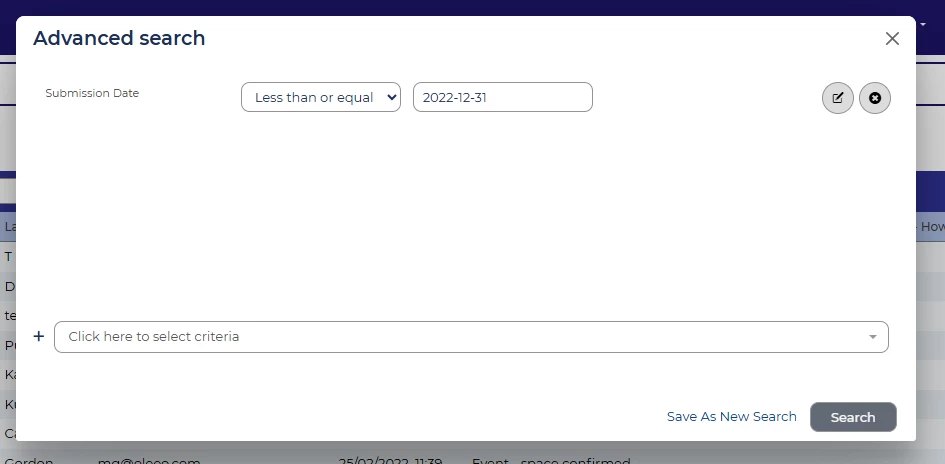
- a set time period after an application submission date.
- If you use a custom date, don't forget to adjust the date each time you run the search and re-save.
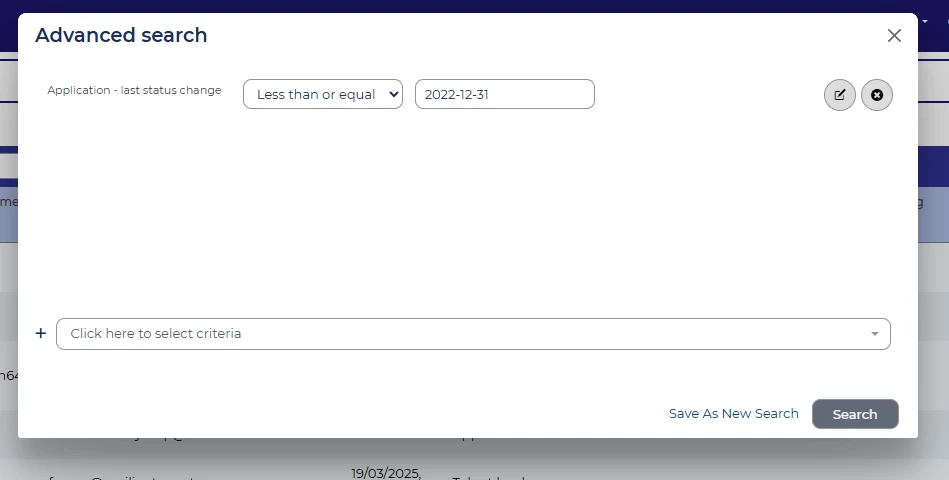
- a set time period after an application last changed status. This is the last time the application moved status for any reason.
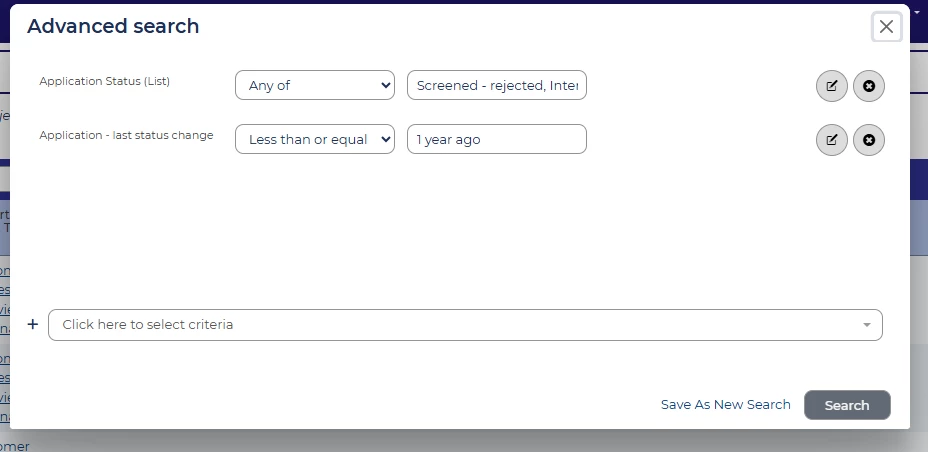
- a set time period after an application moves into a terminal status.
- Lastly once you have located the application/s that need to be anonymised you will either need to select all applications and use the Bulk Anonymise option from the Bulk Actions menu or you can do this individually from the Application Summary page from the Administration menu.
📌 Pro Tip: You can manage applications in different ways depending on the type of role or your business requirements.
🔧 Use case: Applications that have been rejected or withdrawn may have a different retention policy versus applications that are hired. Or applications for senior leadership roles have a longer retention period than entry level roles.
PLEASE BE AWARE! Once applications have been anonymised or deleted, they cannot be recovered.
Manual Deletion
💡 Manual deletion is somewhat similar to manual anonymisation except that you do not need to amend any of the item settings.
Saved searches will still need to be created to ensure the retention criteria is identified.
📌 Pro Tip: You can use both anonymisation and deletion to keep your system clean and data complaint.
🔧 Use case: For example, you may anonymise applications 12 months after their last status change. As a business you track application volumes and DE&I trends for a total of 3 years. Applications older than 3 full reporting years are then deleted as they are no longer needed for any reporting or compliance purposes.
- Lastly, again once you have located the application/s that need to be deleted you will either need to select all applications and use the Bulk Delete option from the Bulk Actions menu or you can do this individually from the Application Summary page from the Administration menu.
PLEASE BE AWARE! Once applications have been anonymised or deleted, they cannot be recovered.
😊 Have you checked that your data is retained in line with your data retention policy or local legislation?
BENEFITS
- Avoid costly fines if data is in breach of local legislation.
- Ensure system performance is maintained.
CONSIDERATIONS
- Consider what sort of trend analytics you wish to report on, such as application volumes year on year or DE&I/EEO monitoring. How far back would you want to report?
- Which profiles do you wish to have the ability to anonymise or delete? The access may need to be applied; either by raising a change request or via self configuration level 2.
- As this is a manual solution, there will need to be contingency for colleague absence.
- PLEASE BE AWARE! Once applications have been anonymised or deleted, they cannot be recovered.
COSTS
This feature is part of the standard product offering.
NEXT STEPS
Speak to your Customer Success Manager for further information and/or guidance.
ADDITIONAL INFORMATION:

