




TIP TUESDAY! Declutter Your Data: Archive With Ease

WHAT IS THE TIP?
💡 Archiving is a great way to keep your system tidy and efficient. This method ensures your system retains key data while keeping your active records manageable.
How does it work?
💡 Archiving is managed within the vacancy and automatically archives all associated applications. This approach means you don’t need to manually archive each application—saving you time and effort while maintaining a clean system.
🔧 Use case:
- End of a Hiring Campaign: Once your hiring process is complete and you no longer need the vacancy active, archive it to remove it from your current workflows.
- Data Retention Compliance: Ensure you’re retaining application data in line with your organisation’s policies without cluttering your active dashboards.
📌 Pro Tip: Before archiving a vacancy, ensure all necessary reporting has been completed. Once archived, the vacancy and associated applications are still accessible (see the additional information section below) but not as readily visible in your main dashboards.
Archive in Bulk or individually
💡 You can either archive vacancies individually or in bulk.
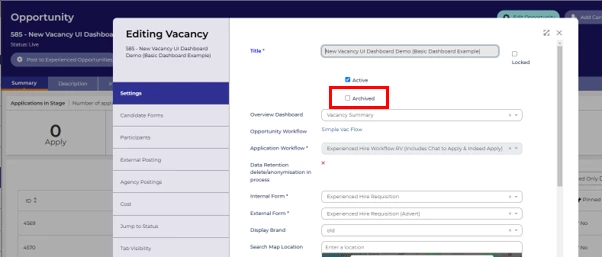
- To individually archive vacancies, simple tick the ‘Archived’ box in the vacancy settings screen.
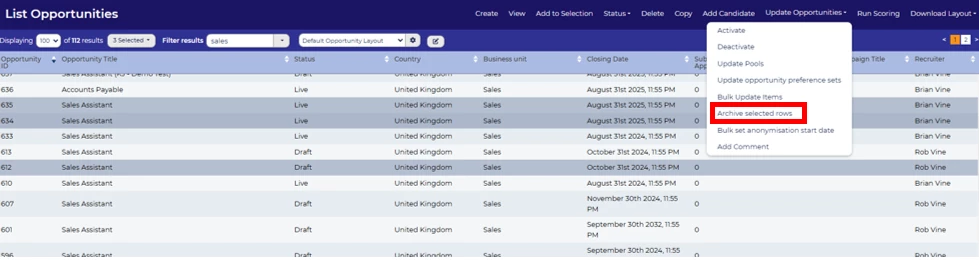
- Several vacancies can be archived in bulk from a list of vacancies from the ‘Update Opportunities/Vacancies’ menu and selecting ‘Archive rows selected’.
😊 Are you using archive data to keep your system tidy? When in your process do you archive data?
BENEFITS
- Streamlined System: Keep your dashboards focused on active vacancies and applications.
- Data Integrity: Archiving vacancies preserves application data, ensuring it’s available for future audits or reporting needs.
- Time-Saving: No need to archive individual applications—one action does it all.
CONSIDERATIONS
- Archiving a vacancy removes it from active views but does not delete it or its associated applications.
- Ensure your users understand the difference between archiving and deleting to avoid accidental data loss.
- Ensure your users know how to switch archive data on/off.
- If you're reporting on historical data, you will want to ensure archive data is included.
COSTS
This feature is part of the standard product offering.
NEXT STEPS
Speak to your Customer Success Manager
ADDITIONAL INFORMATION:
Please note that this is NOT a GDPR solution.
For additional info on data retention and GDPR, check out:

