




TIP TUESDAY! Closing a form

WHAT IS THE TIP?
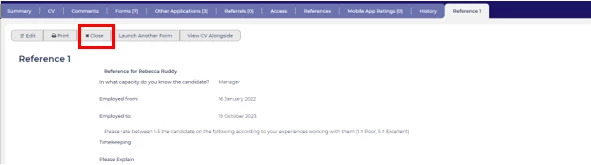
💡 When you are just viewing a form within an applicant record, the best way to close the form, is to click the ‘Close’ button.
💡 Closing a form? Sounds simple right?
Using the ‘Close’ button is a good habit to get into as some forms create multiple versions of the same form.
For example, when multiple screeners or interviewers provide individual feedback, properly closing the form ensures that you don’t accidentally create a blank version. This prevents issues with capturing additional user feedback or data.
We are all guilty of navigating away from an open form or opening another form and leaving the original form hanging.
🔧 Use case: This is very important when using feedback forms where multiple users are providing individual feedback, which creates multiple instances of the same form.
BENEFITS
Prevents blank versions of a form from being created.
CONSIDERATIONS
This does not apply to all forms but is a good habit to get into.
COSTS
This feature is part of the standard product offering.
NEXT STEPS
Speak to your Customer Success Manager if you need further info or a demo.

