




TIP TUESDAY! Click, Drag, Drop - Smarter Form Editing for Level 1 Config Users

WHAT IS THE TIP?
💡 Save time when editing forms by dragging new items, labels, or sections straight into place - no more dragging from the bottom!
Add new fields, labels, or sections exactly where you want them
💡 When editing forms in Level 1 config, it’s tempting to just single-click the Add Item, Add Label, or Add Section buttons on the left. But doing that automatically places your new item right at the bottom of the form - meaning you’ll then have to scroll, drag, and fiddle with positioning to get it where it actually needs to be.
Instead, click and drag your chosen item from the left-hand menu into the form layout, and drop it exactly where you want it to go. It’s quick, tidy, and saves a lot of unnecessary scrolling.
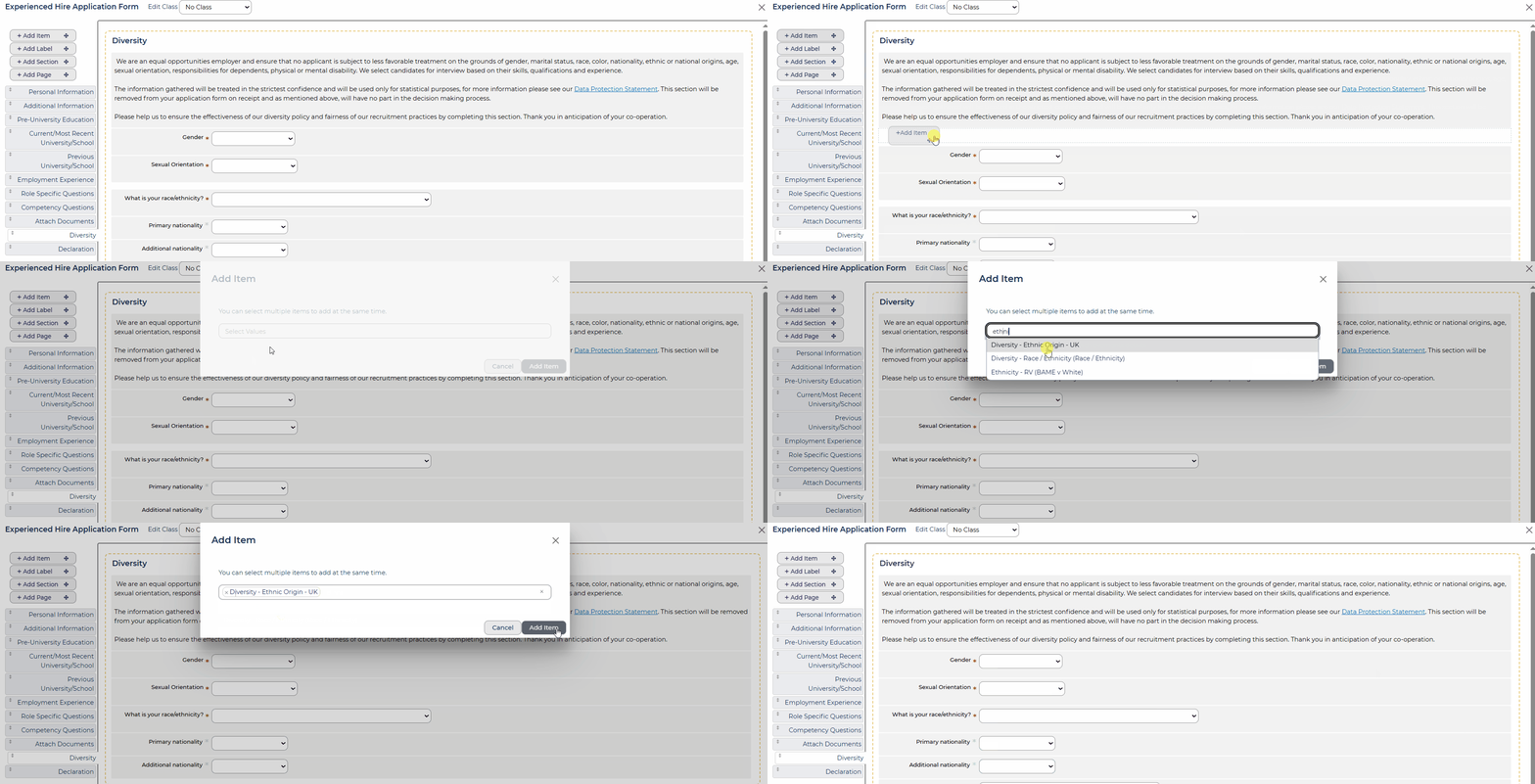
🔧 Use case: You’re adding a new diversity question to a well-organised form with grouped sections. Simply drag and drop the field directly into your ‘Equal Opportunities’ section, placing it exactly where you want it. No more adding to the bottom and moving it up - just save time and skip the frustration!
😊 Got a favourite time-saving trick when editing forms? Share it with us - we love a shortcut!
BENEFITS
-
Cuts down time spent dragging items up from the bottom of the form.
-
Helps maintain tidy, well-structured forms - especially helpful for complex builds.
-
Reduces the chance of accidentally dropping fields in the wrong place.
-
A small tip that makes config feel much more intuitive.
CONSIDERATIONS
-
This applies to Level 1 configuration.
-
You’ll still need to double-check field permissions, dependencies, and visibility settings once placed.
-
Before adding items, make sure you're not adding them to a shared section (unless this is required.) If it is a shared section, the new item will appear on all forms where the section is used.
COSTS
This feature is part of the standard product offering.
NEXT STEPS
Speak to your Customer Success Manager for any further support with this.

