




TIP TUESDAY! Bulk Updates Made Easy: Simplify Your System Management

WHAT IS THE TIP?
💡 Updating items in bulk is a game-changer for managing your data efficiently in Oleeo. Whether you're updating fields, forms, or multiple rows at once, bulk actions save time and ensure consistency.
Spreadsheet Mode: Edit Like a Pro
💡 Perfect for quick updates across multiple vacancies or applications.
Did you know you can activate Spreadsheet Mode directly in your results view? This allows you to update fields as though you were editing an Excel spreadsheet - with all the ease included. Simply select the spreadsheet mode icon to activate; click into a cell, add or change the value, and save your updates - all without navigating to individual records.

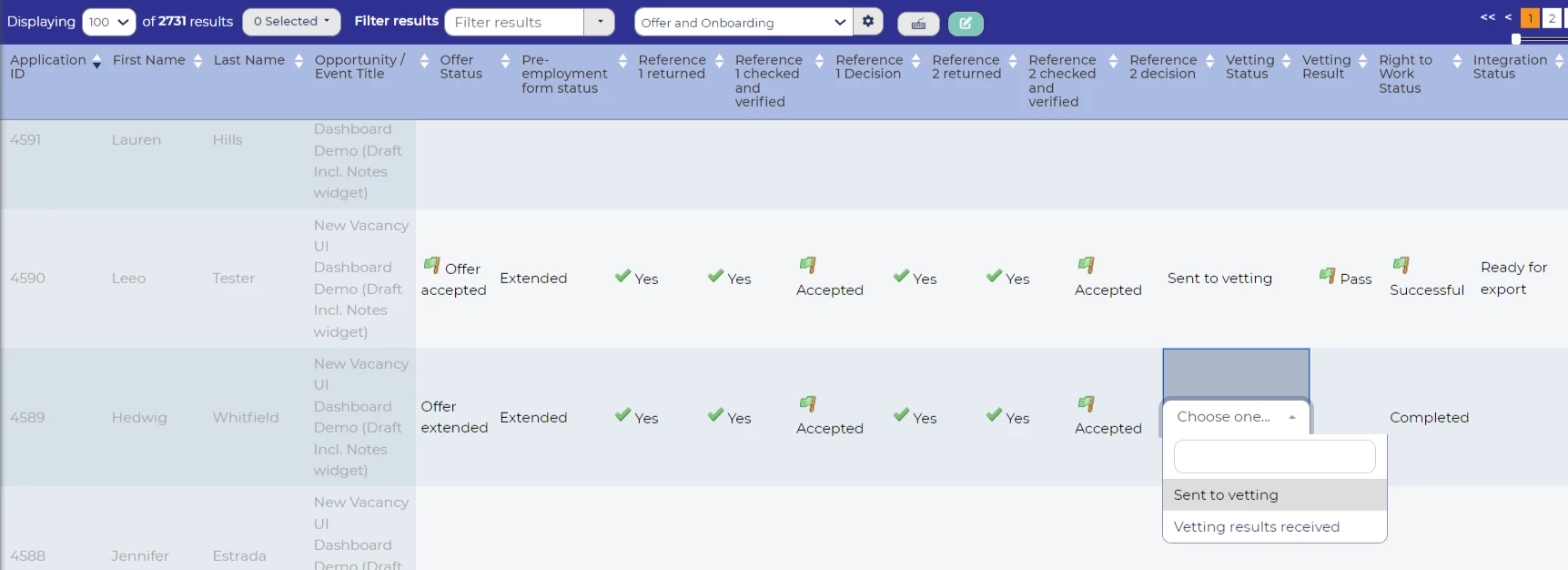
🔧 Use case:
- Customising Feedback at Scale: Ideal for updating fields where each candidate requires a unique value, such as screening or interview scores. Instead of opening each application, you can input individual results directly into the results view, saving time while maintaining precision.
- Correcting Data Entry Errors: Quickly fix typos or inaccuracies across multiple rows, ensuring your data is accurate without repetitive record navigation.
📌 Pro Tip: Unlike other bulk update options, Spreadsheet Mode allows you to tailor changes for each row, making it perfect for updates requiring varied data.
Bulk Update Fields: Apply Uniform Changes
💡 Perfect for making consistent updates across multiple applications in one go.
When you need to apply the same value across a batch of records, Bulk Update Fields is your go-to. This option saves time and effort by allowing you to make uniform changes without editing each record individually.
Navigate to the candidates you want to update, select them (individually or using ‘Select All’), and choose Bulk Actions > Update Selected Rows.

Then:
- Select the field to update
- Enter the new value
- Confirm your changes
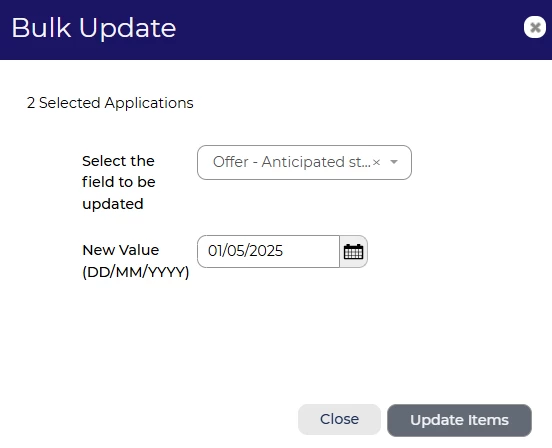
🔧 Use case:
- Bulk updating assessments as passed or failed.
- Updating feedback form decisions, such as; vetting, screening, shortlisting decisions.
- Updating event attendees to mark those who display potential.
❗️ Please note: All selected rows will be updated with the same value. If you need to apply different updates to different records, you’ll need to run this process multiple times.
Bulk Form Updates: Simplify Data Entry
💡 Ideal for scenarios where multiple candidates require the same form updates in one seamless action.
When managing high-volume recruitment, there are times when identical information needs to be added to multiple candidate records - like compliance forms, onboarding details, or group assessment results. Instead of updating each record individually, Bulk Form Updates lets you apply the same data across selected candidates in a single step, saving time and ensuring consistency.
Select the candidates you want to update, then choose Bulk Actions > Bulk Form Update.
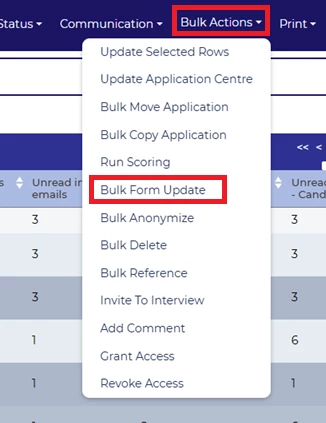
From there:
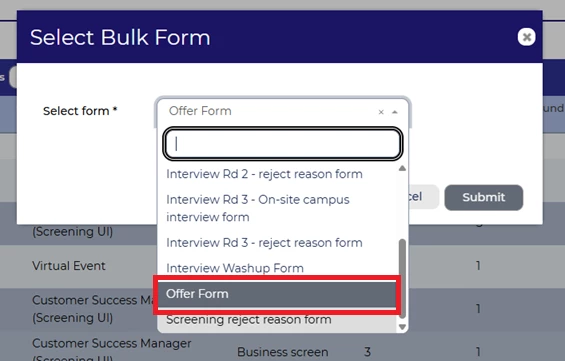
- Pick the form you wish to update.
- Make the necessary changes.
- Submit the form to update all selected candidates with the same information.
🔧 Use case:
- Adding uniform onboarding details to multiple new hires after a successful campaign.
- Completing compliance forms for a group of candidates in a high-volume recruitment drive.
- Updating assessment results for candidates who participated in the same group activity or stage.
❗️ Please note: All fields in the form must be updated with the same information for every candidate. Double-check your entries before submitting to avoid errors!
Uploading Screening & Interview Feedback: Streamline Offline Reviews
💡 Perfect for teams who prefer offline screening or need to manage bulk interview feedback efficiently.
Some screeners or interviewers may prefer to review applications offline. With Oleeo, you can seamlessly upload their feedback back into the system, saving time and ensuring all data is centralised.
- Export a Feedback Template: Download a spreadsheet pre-filled with Application IDs via Applications > Export Recruiter Form, located in the left hand menu.
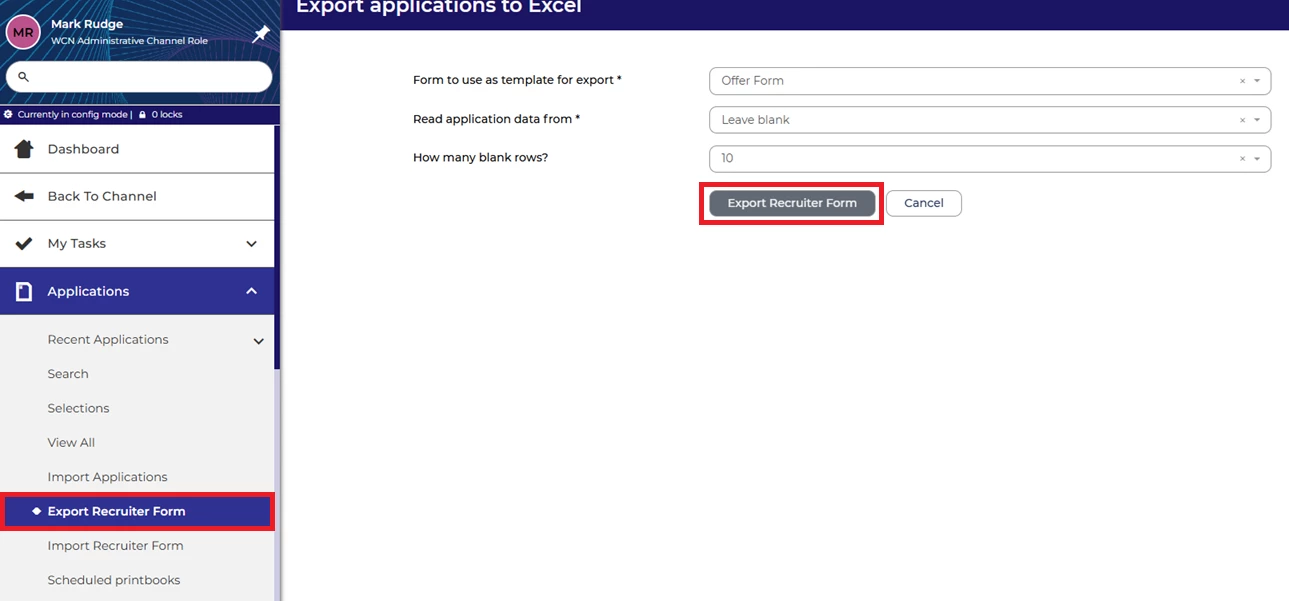
Export Recruiter Form - Input Feedback Offline: Fill in the spreadsheet with feedback for each application.
- Upload Feedback: Return to the system and use Import Recruiter Form to upload the completed file. Each form will now be added to the candidate’s application and can be viewed in their Forms tab.
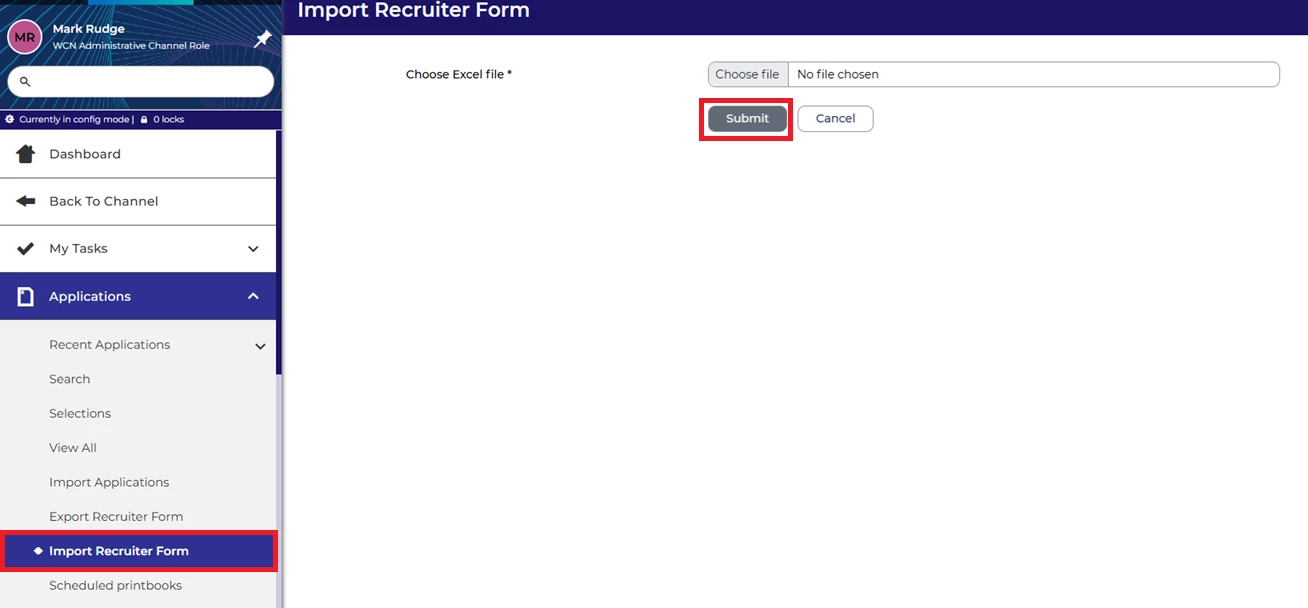
For detailed step-by-step instructions, check out this guide.
🔧 Use case:
- Screening Feedback: Streamline the process for screeners who prefer offline reviews by allowing them to input feedback directly into a spreadsheet for bulk upload.
- Interview Feedback: Simplify the collation of feedback from multiple interviewers in group assessments or panel interviews.
❗️ Please note:
- The Application ID is mandatory for successful uploads. Double-check this column is correctly populated.
- Ensure the correct feedback form is selected during export to avoid unnecessary fields in the spreadsheet.
- All feedback fields must match system configurations to be successfully imported.
By leveraging Oleeo’s bulk feedback upload feature, you can ensure accurate and efficient data handling while accommodating offline workflows.
😊 Share Your Success Stories! Have you used bulk updates to simplify your workflows? Let us know how it’s helped you manage your data more efficiently!
BENEFITS
- Efficiency: Save hours by managing updates in bulk rather than individually.
- Consistency: Ensure uniform updates across multiple records.
- Flexibility: Choose the method that best suits your needs, including allowing reviewers to work offline, accommodating different workflows and preferences.
CONSIDERATIONS
- Fields and forms must be configured as bulk updatable in the settings.
- Double-check the selected records to avoid unintended updates.
- For complex updates requiring different values, consider running separate bulk actions.
COSTS
This feature is part of the standard product offering.
NEXT STEPS
- Identify areas in your system that would benefit from bulk updates.
- Ensure your items are configured for bulk actions.
- Speak to your Customer Success Manager for further guidance or tips on optimising your bulk updates.
ADDITIONAL INFORMATION:

