




TIP TUESDAY! Bulk update your database as though it were an Excel spreadsheet

WHAT IS THE TIP?
💡 Did you know that you can utilise Oleeo’s ‘spreadsheet mode’ function in any results view, and update vacancies or applications in bulk?

When spreadsheet mode is activated, items can be updated by simply selecting into the cell and adding the correct values. Add new information, or update existing fields quickly and without fuss - exactly as you would an Excel spreadsheet!
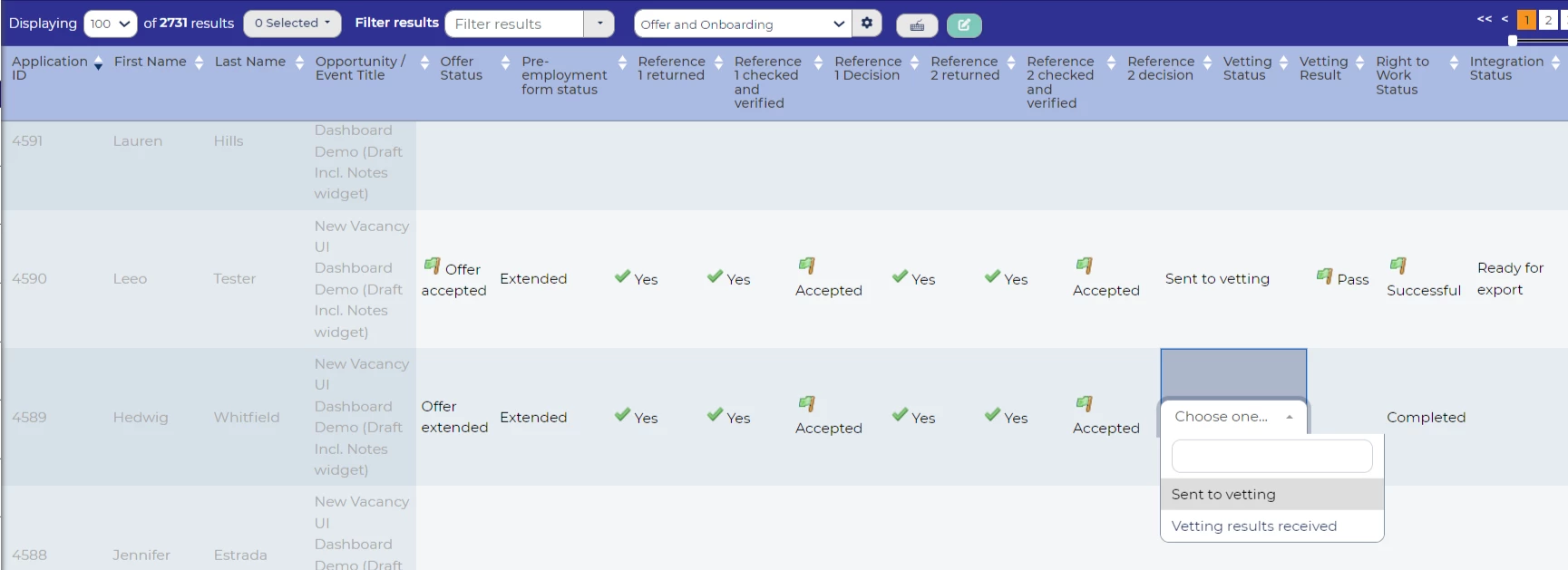
NB: Items you wish to update in this mode must be marked as ‘bulk updateable’ within the item settings.
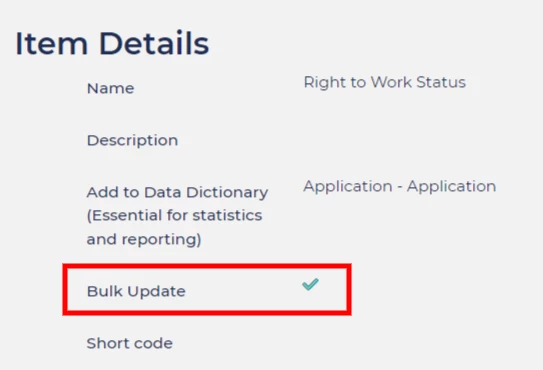
Spreadsheet mode is compatible with the following types of field:
- Date
- Free text (less than 255 characters)
- Look-up
- Numeric
- Boolean
BENEFITS
Increase efficiencies by quickly updating fields in bulk.
Useful when:
- Completing shortlisting forms in bulk
- Inputting interview feedback
- Updating vacancies in bulk
- Updating pre-employment check results
- Updating assessment scores
- Updating event feedback
- and so on…..
😊 How is this making your team more efficient? Tell us how you use spreadsheet mode below.
CONSIDERATIONS
Want to lock down access to this functionality? Access to spreadsheet mode can now be set per user type and set against vacancies and / or applications - please ask your Customer Success Manager for more information.
Is a field you wish to update in bulk greyed out? Speak with your systems team, or Oleeo supported user to get this updated.
COSTS
This feature is part of the standard product offering.

