




Dashboard widget: A Count of Applications by Status
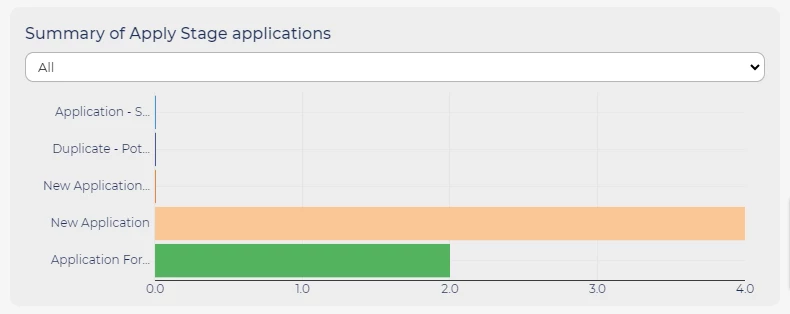
The 'A Count of Applications by Status' widget is designed to provide a visual representation of the number of applications that match specific statuses or stages of your choice.
STEPS TO ADD
-
Click on the tab where the widget will be placed.
-
Open the tab's dropdown menu and select 'Add Widget'.
-
In the Choose Homepage Widget field, select A Count of Applications by Status.
-
Select the limit type from the Choose Limit Types dropdown list:
-
StatusValues - With this option, you can manually choose the specific statuses you wish to display on the chart from the complete list of statuses available within the system.
-
StatusGroups - This option enables you to select predefined groups of statuses, eliminating the need to manually select each status individually.
-
Status Group Set - Use this option to categorise applications based on recruitment stages instead of individual statuses. To set up Status Group Sets, please consult a super user if they are not already available in your system.
-
-
Next, choose the 'StatusValues', 'StatusGroups', or 'Status Group Sets' you wish to incorporate into the chart. Please note that StatusValues and StatusGroups support multiple selections, while Status Group Sets allow only a single selection.
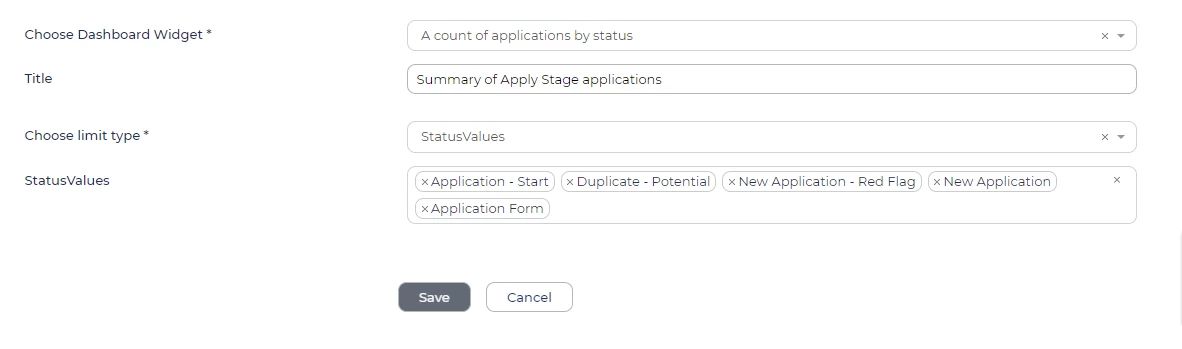
Add widget form for ‘A count of applications by status’. -
Click Save at the bottom of the form once you have completed and added all the information.
-
Your new widget will be displayed on your homepage in the form of a bar graph. Here, you can:
-
Click on the bars to access a list of applications in that particular status.
-
Utilise the dropdown menu at the top of the chart to filter and display only the applications related to a specific opportunity.
-

