




TIP TUESDAY! Roll-ups, Roll-ups - see your data more clearly!

WHAT IS THE TIP?
💡 Did you know that you can bring statuses together under different groupings to reflect your process stages? You can do this for item values too!
You can build status group sets for your application or vacancy statuses and rollup lists for your item values - which you can use throughout the system. For example, are you struggling to tell the right story with your reports? Do you find it hard to see what the data is telling you? Would you like to speed up creating your Talent Engagement (Engage) articles?
Create Clearer Reports
💡 Tip - Build much clearer reports using your status group sets and rollup lists - present the granular detail that you capture in a way that tells the story that you want to read.
Using these two types of groupings in your reporting can allow you to present the information more clearly; so that the message you want to deliver is not missed in the ‘noise’ of the data.
Scenario 1: (comparing a status group and a rollup list)
I need to report on the candidate funnel for protected characteristics within the recruitment process - starting with Ethnicity.
I have built a graph to show the percentage of each ethnicity at each stage at a high level.
For the example below I have a status group set which groups my application statuses into 5 key areas as well as a rollup list which groups all ethnicity responses into either White or BAME.
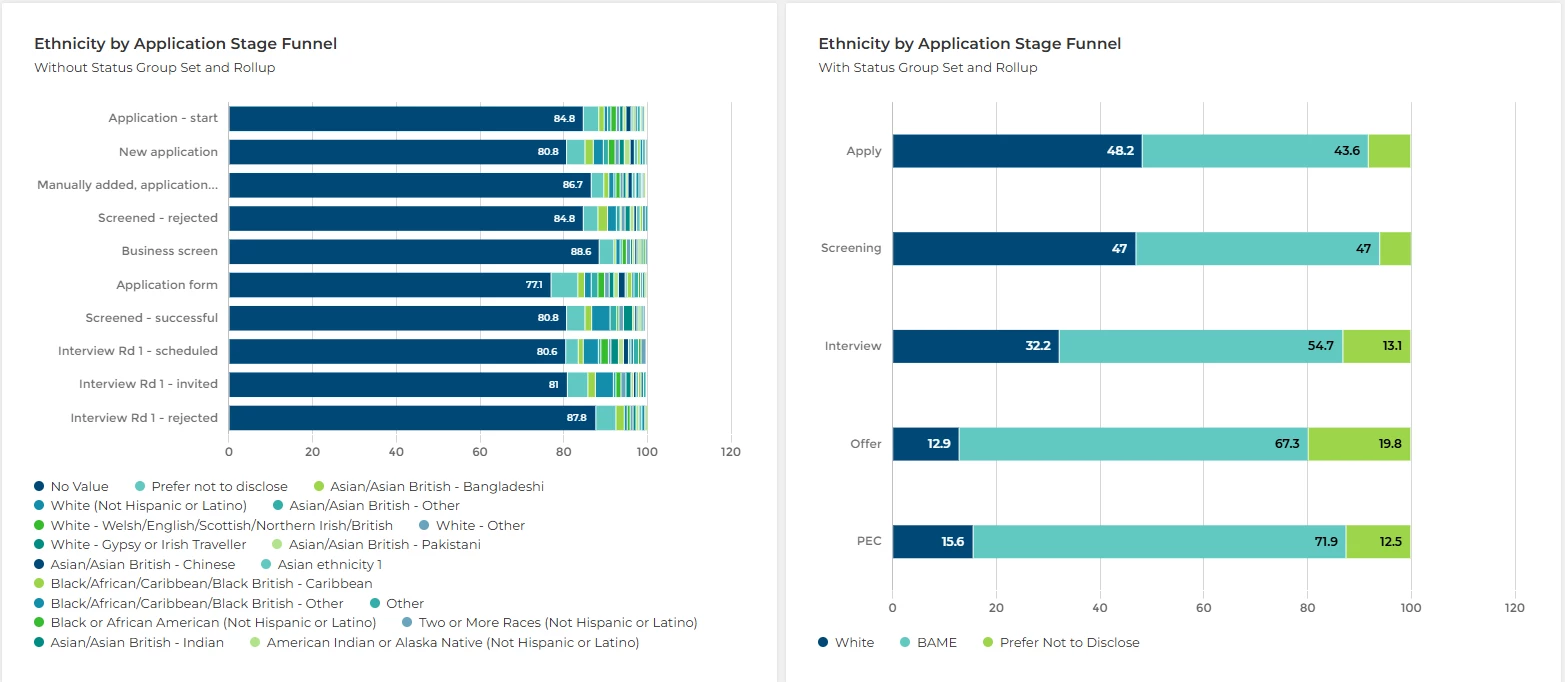
The 1st graph is impossible to read, whereas the second graph clearly shows the ethnicity trend at each stage of the recruitment process.
I could then take this further and present the recruitment stages or Ethnicities in more detail by setting up additional status group sets and rollup lists, for example: perhaps create a business area roll up list to show how each department is performing. Comparing applications received and then hires made can make this powerful.
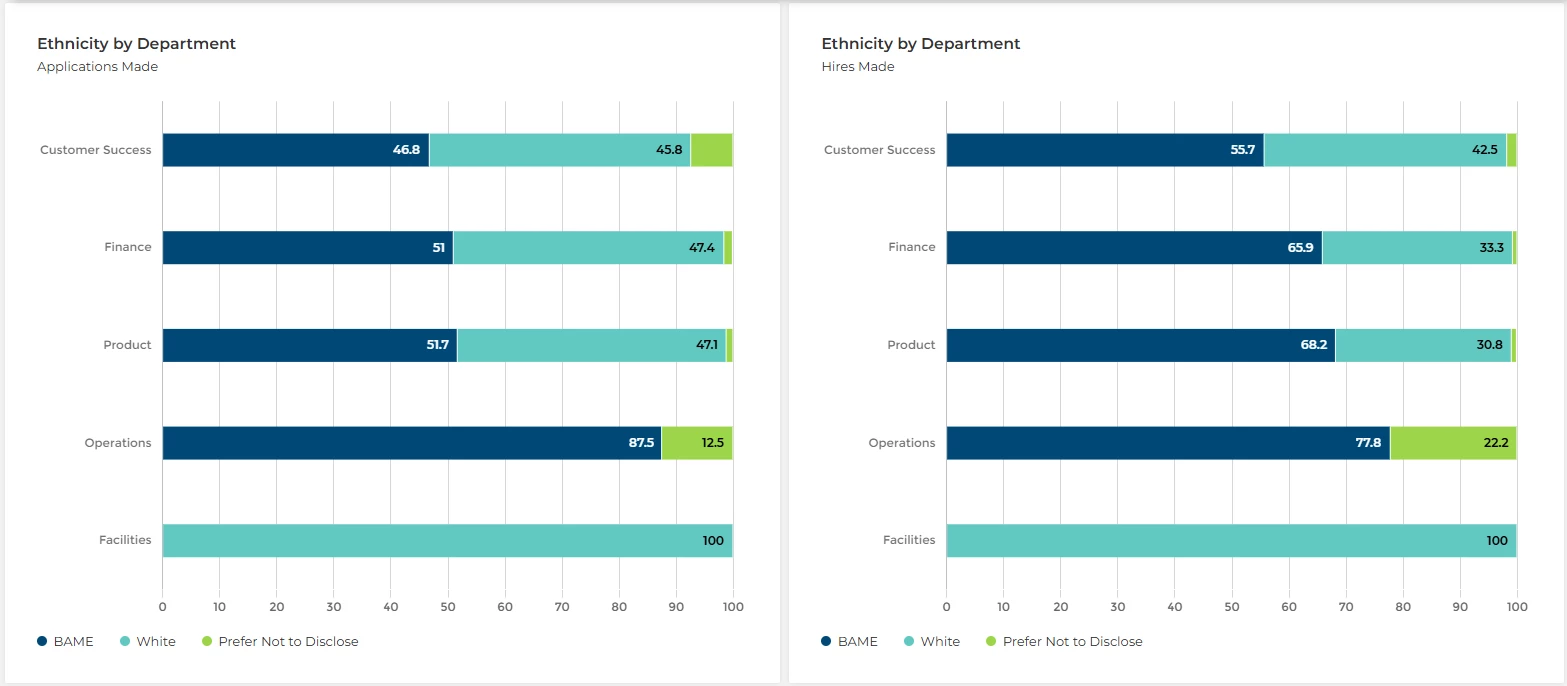
Please note: for funnel reporting, all statuses will need to be accounted for in one of the groupings as otherwise it may return a no value entry. We recommend adding all unused statuses into the first apply stage as all candidates usually pass through this group before progressing along the funnel.
Scenario 2: (comparing 2 status groups)
I need to understand why my candidates are unsuccessful at each stage of my application journey, did they withdraw or did they not meet the criteria?
I have built a graph to show the reason for an unsuccessful application at each stage of the recruitment process.
For the example below I have created a status group set which groups my application statuses into 5 key areas as well as a status group set which groups all my unsuccessful application statuses into either a Withdrawn group or a Fail group.
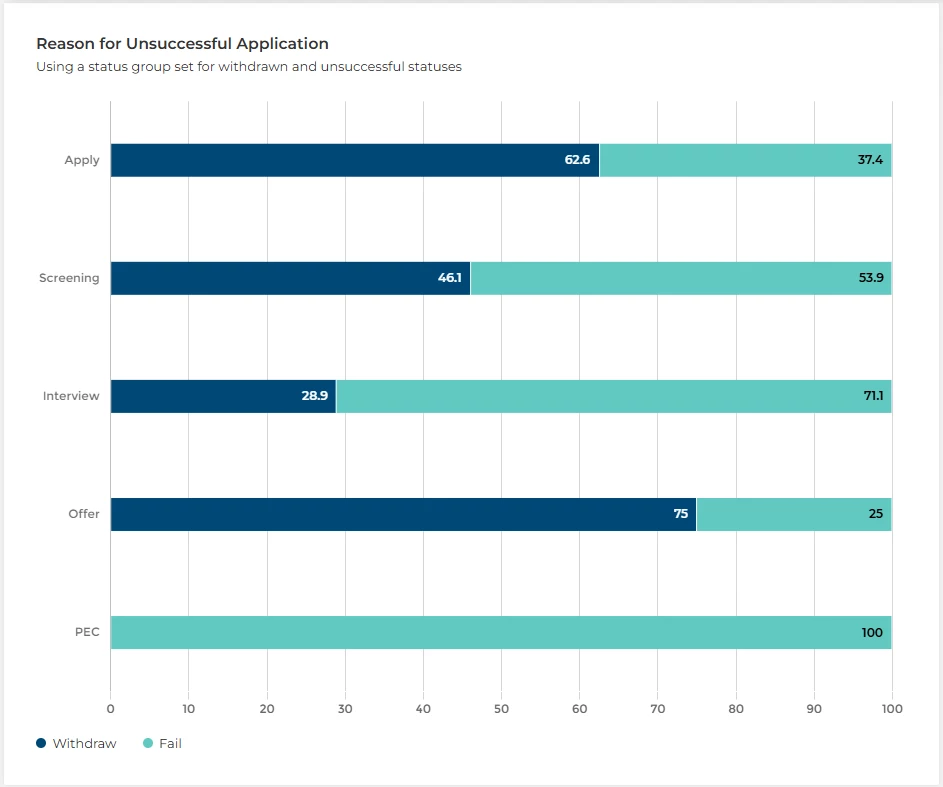
This allows me to clearly see where in the process people are withdrawing vs perhaps failing to meet the required criteria to progress.
I could then take this further and present the recruitment stages in more detail, perhaps looking at particular assessments within the shortlisting process.
Time in Stage Reporting
💡 Tip - Don’t use the same status group sets as above! When building your status group sets for your time in stage reporting, make sure you don’t include terminal statuses as this will return inaccurate data.
We would recommend that you copy the status group set that you want to use, rename it to show it is to be used for your time in stage reporting and then remove all terminal statuses from it before setting up your time in stage report.
Scenario 1:
I have been tasked on building a report to show the average amount of time my candidates spend in each high level stage of the recruitment process.
I have built a time in stage report to show the average time candidates spend in each stage of the application process.
For the example below I have included examples of how not removing the terminal statuses from your status group set can affect your data.

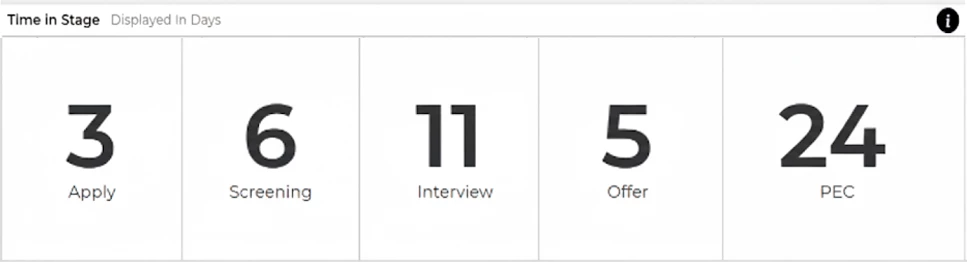
📌Pro Tip - You can build reports targeting specific statuses! Contrary to funnel reporting you can be selective on which statuses you would like to measure the average time a candidate spends in these.
Scenario 2:
How do we perform at interview stage when it comes to progressing candidates through the journey?
For example, if you only wanted to track the time it takes for candidates to progress through the interview stages you could set up a status group for the relevant statuses relating to each interview stage only.
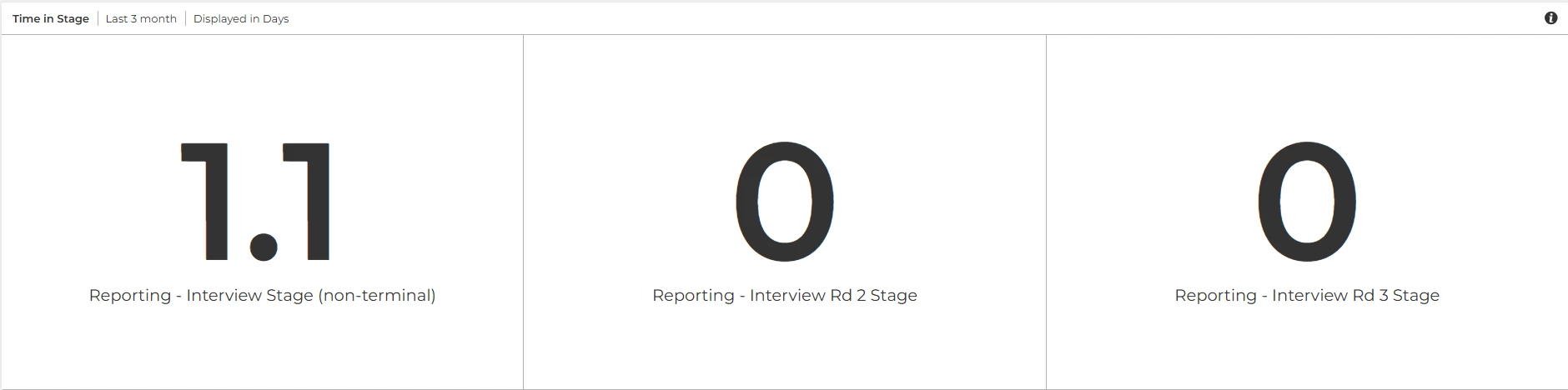
Please note: It is recommended to have a very clear naming convention for all the status groups you set up to avoid any confusion when it comes to building your reports.
Talent Engagement
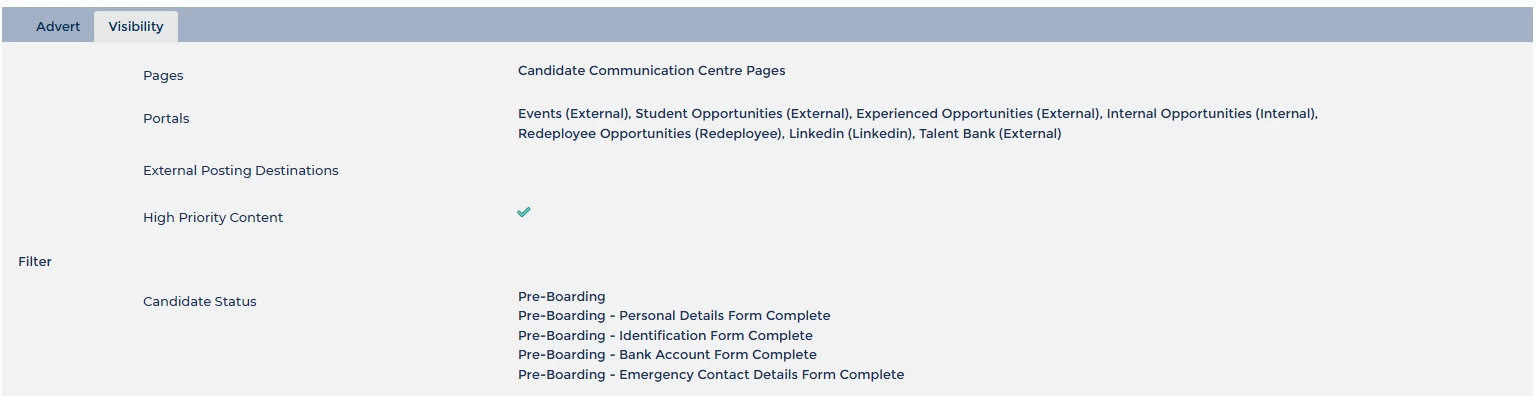
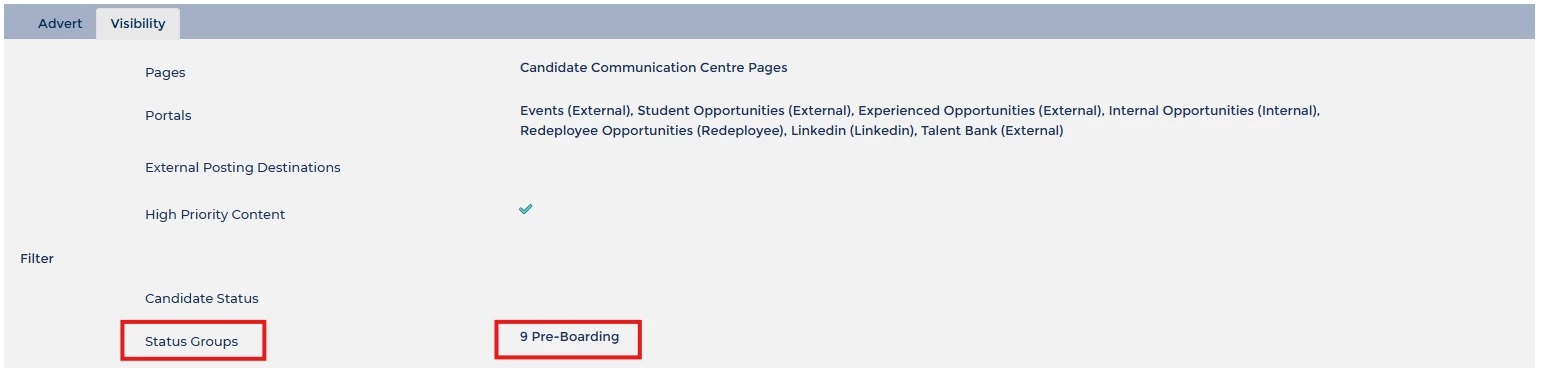
💡 Tip - You can target your adverts to a specific status group set - instead of separately adding each status into your visibility rules.
This not only saves you time, but should you wish to make changes in the future, you will only need to update the status group set instead of potentially adding a new status to multiple adverts.
😊 Tell us your wins! We’d love to hear how you are using this feature. How are you currently using status group sets and rollup lists in your system? Do you want to start using these and need a nudge in the right direction?
BENEFITS
- Clearer data visualisation whilst still having access to the granular detail
- Ability to customise your data to see what you want to see, tell the story you want to tell
- Save time when managing Talent Engagement adverts
CONSIDERATIONS
If you update any item lists or add/remove any statuses to your process, you will need to remember to update any rollup lists or status group sets.
You will need level 2 self-configuration training to build these in your configuration environment.
COSTS
This feature is part of the standard product offering.
NEXT STEPS
Speak to your Oleeo system admin, or ask them to raise a case to the Oleeo support team for guidance.
ADDITIONAL INFORMATION
Search for Rollup Reporting or Status Groups in the configuration guide for more information on how to set these up in your system
Check out this article for more information on creating a time in stage report:
Check out this article for more information on creating your talent engagement adverts and pages:

